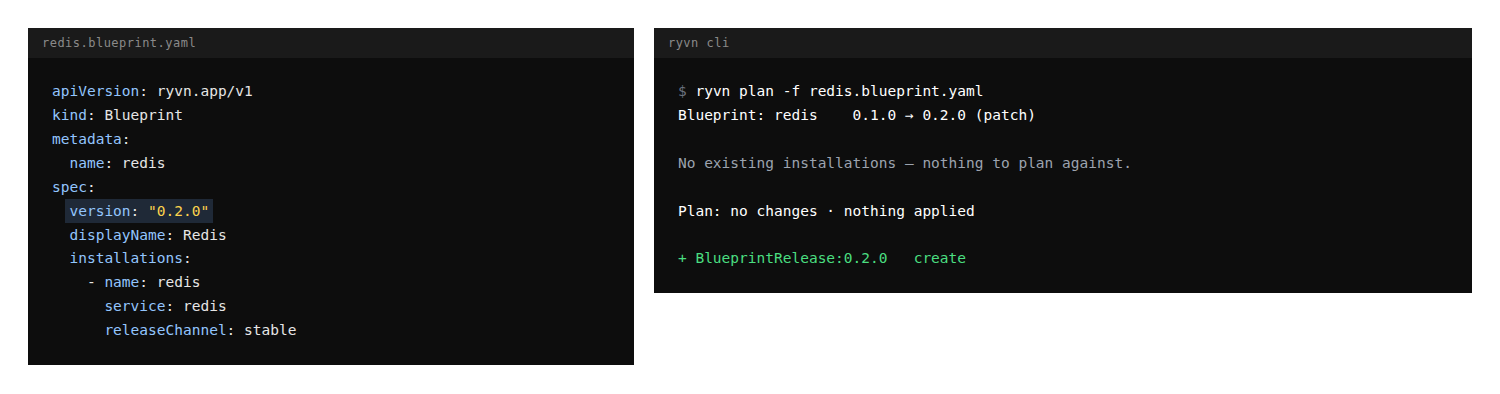
You can now choose the version a blueprint release is published under by setting spec.version in the blueprint YAML — 1.4.0, 2.0.0-rc.1, or a maintenance release like 1.4.3 after 2.0.0 already exists. The version your changelog, support docs, and customers refer to is the one Ryvn publishes, and the same content synced twice reuses the existing release while different content under a taken version is refused as a conflict instead of silently renumbered. ryvn plan shows the requested BlueprintRelease under the blueprint before you sync, and the Git Sync pages list the published version and release ID after each sync; leave spec.version out to keep automatic numbering.
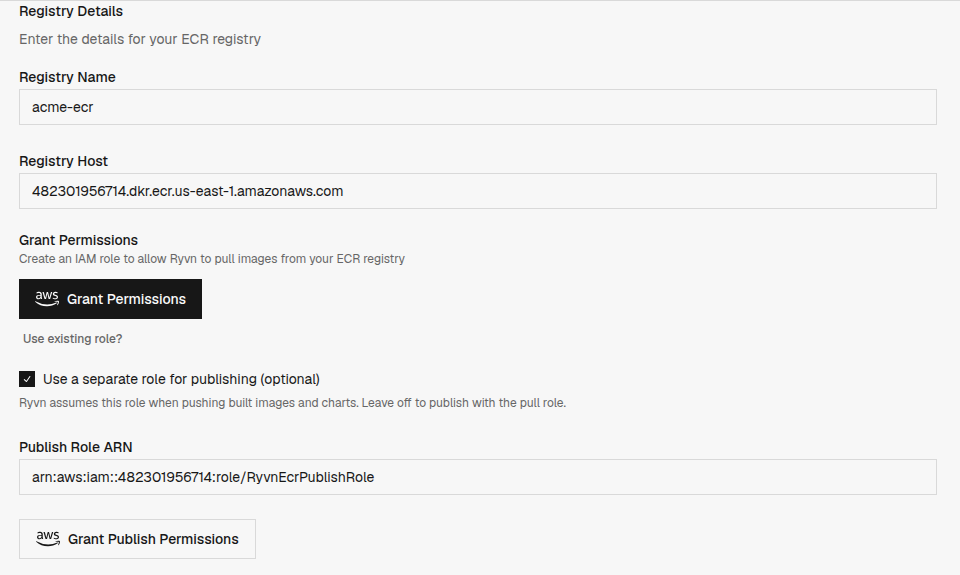
Services that Ryvn builds from GitHub can now push their images and Helm charts to a registry you own — ECR, GHCR, Harbor, Docker Hub, or any OCI registry — instead of the Ryvn Registry. Bind the service to a connected registry and set image to the tag-less repository it should publish to, and every release lands in your registry under your retention, scanning, and access controls. If pull and push need different credentials, add a dedicated publish credential — an IAM role for ECR or a push-scoped token for generic registries — under Settings > Private Registries; GitHub Actions workflows using the Ryvn build action pick up the brokered publish login automatically.
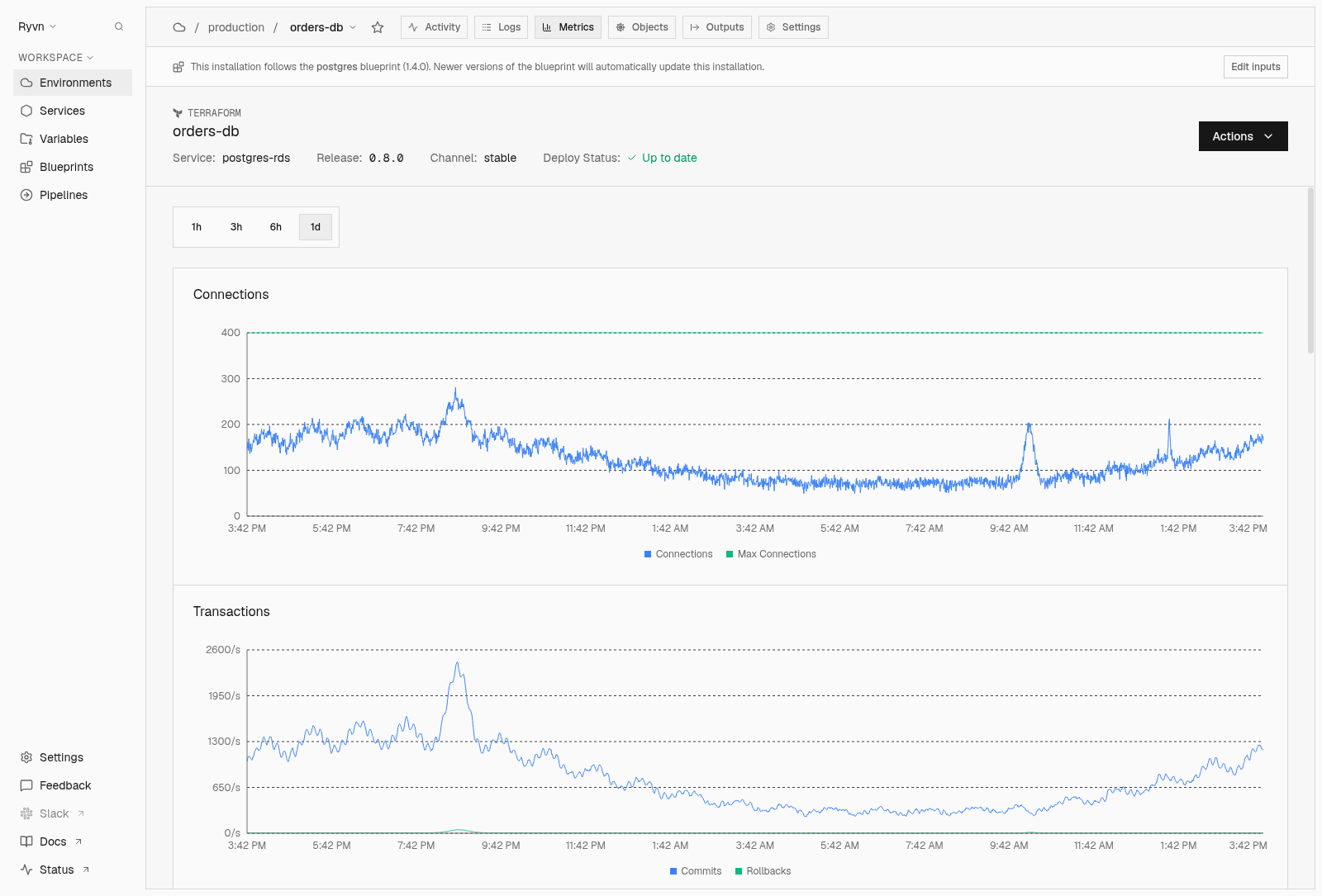
Your managed Postgres installations now show engine metrics in the Metrics tab: connections against the server limit, commits and rollbacks, active queries, rows read and written, cache hit ratio, deadlocks, longest running transaction, database size, and WAL growth. You can see a connection pool filling up, a stuck transaction, or a database growing faster than expected next to the services that talk to the database, without opening the cloud console. The postgres blueprint collects them by default on Amazon RDS, Cloud SQL, and Azure Flexible Server through a monitoring role that reads statistics and never your data, and the same series are available in Grafana.
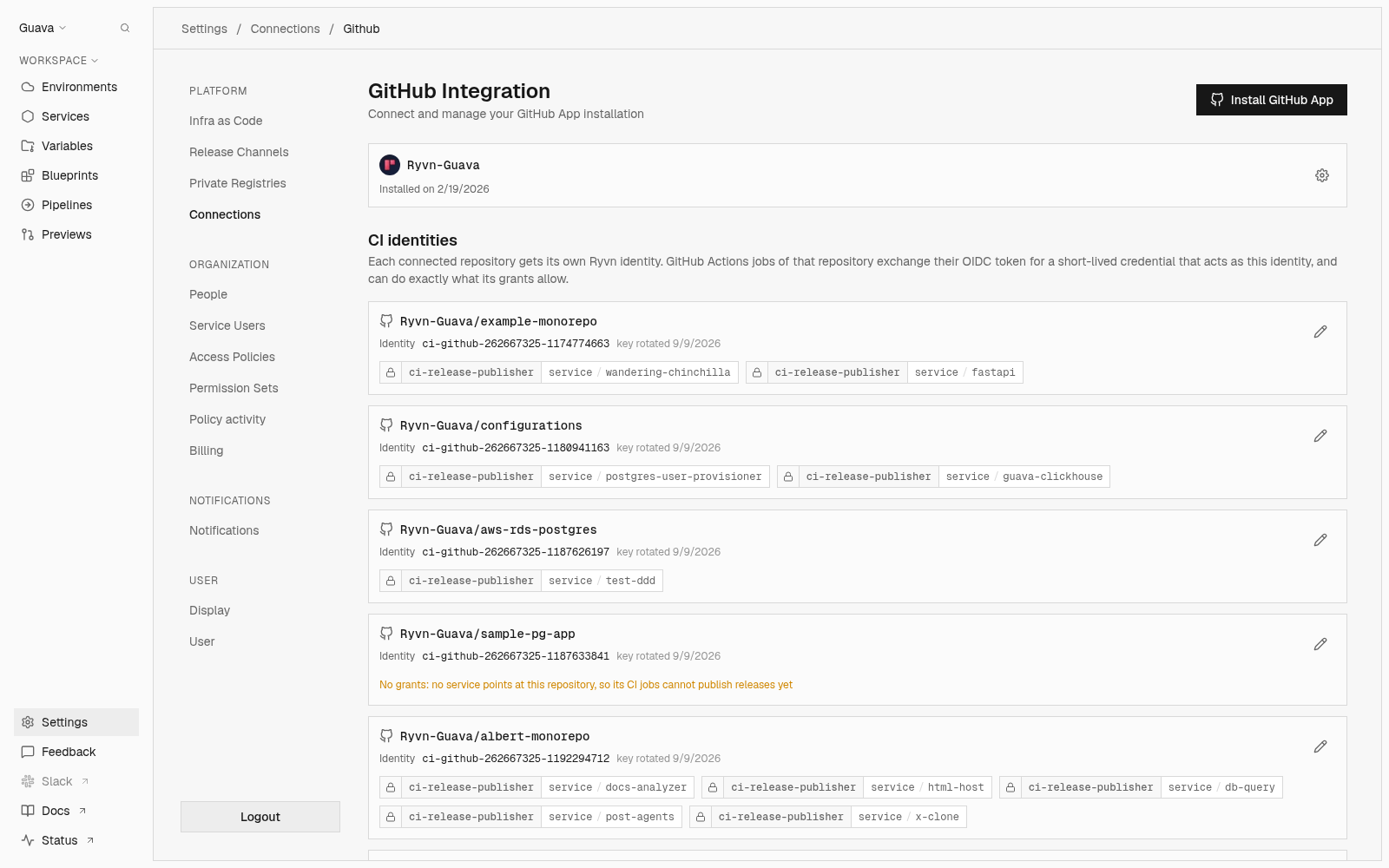
Your GitHub Actions workflows now authenticate to Ryvn with the job's own GitHub identity instead of a client secret stored in the repository: the job requests its OIDC token with id-token: write, and the Ryvn CLI exchanges it for a short-lived credential scoped to publishing releases for the services that repository owns. You have nothing to store, nothing to rotate, and nothing that keeps working after a leak, and each connected repository gets its own CI identity whose grants you can review under Settings > Connections > GitHub.

Server installations now scale on any metric you already collect: add a Prometheus Query trigger under Scaling in installation settings, point it at a Prometheus-compatible endpoint your environment can reach, and give it a query and a threshold. Replica counts can follow request rate, queue lag, or any business metric your own monitoring exposes, instead of only the CPU, memory, queue, and schedule signals Ryvn measures itself. Choose whether the threshold applies per replica or as an absolute value, set an activationThreshold to hold the workload at zero replicas until real demand arrives, and configure it all from the UI or YAML.

Ryvn now publishes a preview release for every existing blueprint your pull request modifies, attached to the PR's preview channel. Blueprint installations pinned to that channel pick up the change, so you can test new inputs, service configurations, and added installations end-to-end before merging. Closing or merging the PR tears the channel down and prunes attached preview releases.

An access policy groups members, users by email or service users by name, with the grants they all share: a role on an environment, service, blueprint, or the org itself. Giving five engineers operator on three environments used to mean fifteen grants to keep in sync, and now one policy carries them all. Use * in place of a resource name to extend a grant to every resource of that type, so viewer:blueprint:* covers blueprints nobody has created yet.
AccessPolicy is a first-class resource. Commit it to your IaC repo alongside your services and environments, manage it from Settings, or iterate on it locally with ryvn create -f / ryvn replace -f.

ryvn plan is now supported for all resource kinds instead of being limited to just Blueprints. ryvn plan enables you to preview changes made to IaC resources and surfaces notices and effects that those changes will have. This provides more guardrails and safety, especially when using agents for helping you configure Ryvn resources. If you have resources checked in and synced from Git, a plan is automatically run and output is shown as a pull request comment.

Pin an installation to the release it is running from Actions > Pin installation or with ryvn set version-pin, and optionally pin its configuration revision too. Release channel updates stop deploying while the pin holds, and a banner on the installation shows the pinned version and who pinned it. Unpin and the installation catches up to its channel's latest release.

Plan a Helm or Terraform change from Actions on an installation, or a Helm change with ryvn command dry-run in the CLI, then hit Approve on the resulting task to apply the exact diff you reviewed, with no second run that could pick up different state. Appliability is decided when you request the preview rather than by the environment's approval policy: Disable approvals (or --disable-approvals) gives you a read-only plan, a Terraform preview from the CLI stays read-only so it never holds the state lock, and the previews Ryvn renders for pull requests and git sync are never appliable.

A new Activity tab on every service surfaces its full change history: who created or updated the service, and what changed in each spec revision. Expand any configuration event to see a field-level diff of exactly what changed, rendered side-by-side so you can review the before-and-after at a glance. The feed shows direct spec changes by default; Filter folds in releases landing in a release channel and changes that arrived through Git sync.

Server installations can now scale on a schedule. Pick the days, a start and end time, a time zone, and the minimum replica count under Scaling in installation settings, and Ryvn maintains that capacity while the window is open, scaling up as needed by other triggers.
Schedules sit alongside the existing CPU, memory, and queue triggers, and they are configurable from the UI, YAML, and the CLI.

Delete a single stuck Pod from a service installation without kubectl or direct cluster access. Every Pod in the installation's resource view now has a delete action that runs through a scoped agent task — Ryvn verifies the Pod still belongs to the installation before removing it, offers an optional Force delete to skip graceful shutdown, and records each deletion in the installation's activity feed. It works across helm-chart, web-server, and job installations, so you can clear a wedged Pod and let Kubernetes reschedule a fresh one in its place.

Restart the workloads in a helm-chart service installation on demand. Pick individual Deployments, StatefulSets, and DaemonSets, or restart them all, from the installation's Actions menu, the new ryvn command restart CLI command, or the API. No kubectl or direct cluster access is required. A rollout restart bounces the current pods without changing the deployed version or config, so you can clear stuck state or pick up rotated secrets.

Give each environment its own approval policy so the people who own the cloud decide when changes land. For BYOC deployments where you run inside an end-customer's account, set that customer's environment to Require approval and every installation task waits for a manual approval of the previewed change before it applies — while your own environments stay on Auto-approve and ship without prompts, or on Use service default to defer to each service. The policy lives on the environment's requireApproval field, so it flows through YAML and the CLI and stays in Git sync alongside the rest of your environment config.
A new official CloudFront Edge blueprint lets you secure public endpoints for services in your AWS environment with AWS WAF and CloudFront viewer mTLS. It deploys a CloudFront distribution in front of Ryvn's origin, so CloudFront handles public traffic instead of Ryvn's default edge proxy.
The blueprint can set up AWS WAF for the distribution, or attach a WAF configuration you already have. With a new WAF, you choose which AWS managed rules to enable for common web attacks and whether to restrict access to trusted IPs. Viewer mTLS uses your own CA to verify client certificates at CloudFront before traffic reaches your service.

Rename a Terraform installation without redeploying it. Open Actions > Rename installation on any standalone Terraform installation and enter the new name. You can also rename declaratively with renamedFrom in a ServiceInstallation YAML resource or through the PATCH /v1/installations/{id} API.

Open a pull request that modifies a blueprint and Ryvn automatically posts a change impact analysis on the PR. Each affected blueprint gets a one-line rollup of affected installations — expand any row for the per-installation plan showing resources added, modified, removed, or flagged for attention, using the same structured diff vocabulary as ryvn plan. The analysis runs on every PR validation with no setup required, so your team can review the blast radius before merging.
See exactly what will change across your environments before you apply. ryvn plan compares your local blueprint YAML to what's currently deployed and shows you every service that will be created, updated, or replaced — so you can review the full impact before anything runs.
The output walks through each service affected by the change: configuration diffs show exactly which values are changing, new services display their full spec, and secrets stay redacted. You can scope the preview to a single service with --installation, get machine-readable output with -o json, or use --detailed-exitcode to gate your CI pipeline — exit 0 means no changes, exit 2 means changes are pending.

Compare any two blueprint versions side-by-side without leaving Ryvn. A toggle on the blueprint detail page activates compare mode. Pick a second version and the panel shows a structured diff of installations, inputs, outputs, and input groups that were added, removed, or changed. For installations with configuration changes, an inline diff editor renders the before-and-after so you can review exact differences at a glance.

GitHub-sourced services now surface their CI build status and logs directly in Ryvn. The releases page, the install activity card, and the Automated Releases settings card all show a live build indicator with elapsed duration and the failing step name when something breaks. Expand any build to open its full GitHub Actions output inline, timestamped, color-coded by severity, with per-step attribution. Failed builds auto-expand so you land on the error without a click.

A new Activity tab under Settings > People surfaces a live timeline of every access change in your organization — role grants, revocations, member removals, and access policy updates.

A new IaC Overview page in Settings → Infra as Code lists every resource in your organization on a single screen, classified as synced from git, drifted, or unmanaged (created directly in the dashboard or CLI) — so you can see how much of your platform lives in code at a glance.

Group and sub-group the environments list in two levels. Open the view settings popover and pick a primary axis — a label key, provider, or release channel — then a secondary axis, and the table reflows into a collapsible outline so it's obvious how a fleet of environments fans out across regions, customers, or stages of a pipeline.

Install a service before its release exists. The installation sits in a Waiting for release state and starts deploying automatically the moment a release lands in its release channel.
While an install is waiting, Ryvn surfaces the next step inline on the installation. If the service has releases on other channels, a one-click Add release to channel action shows up pre-filled with the latest. If the service has no releases yet at all, the install picks up automatically as soon as the first one lands.
You can now attach key/value labels to a service release — the same labeling model already on services and environments. Tag a release with whatever your CI already knows — the owning team, a hotfix flag, the upstream pipeline run — and read it back from ryvn describe release or the release detail page to drive your own rollback, promotion, and audit logic. Pass repeatable --label key=value flags to ryvn create release from the CLI, declare them under labels: in your <service>-release.ryvn.yaml metadata file, or edit them inline from the release page in the app.
Azure environments can now provision into a VNet that already exists in the target Azure subscription instead of standing up a new one. Set config.existing_vnet_id to the VNet's Azure resource ID and config.vnet_cidr to a range inside it, and Ryvn carves its AKS subnets out of that range.
Most deployments don't need this — Ryvn provisions the full Azure stack, VNet included, whether the target is your own subscription or your customer's BYOC tenancy. This is for the cases where a network team needs to own the VNet themselves: a hub-and-spoke topology enforced centrally, ExpressRoute or a central firewall on the path, address-space allocations that have to come out of a corporate IPAM. They hand Ryvn a VNet and a CIDR; Ryvn drops in.
Every environment now exposes a stable list of outbound IPs that workloads use to reach external services. Allowlist them on an IP-restricted database, a partner API, or a vendor firewall. They show up in the Ryvn web app under Environments → your environment → Settings → Infrastructure, via ryvn describe environment from the CLI, and as the .ryvn.env.state.outbound_ips template variable for installation YAML. Works on AWS, Azure, and GCP.
Blueprints can now publish independent releases from multiple Git branches. Declare a branches list in your blueprint spec, and each push to a declared branch produces a release on its own release channel. See the branch deployments docs for the full configuration reference.
Pin a blueprint installation to a branch by setting the branch field instead of releaseChannel. The installation resolves to the matching branch channel automatically and upgrades whenever a new commit lands on that branch.

You can now attach key/value labels to services — the same labeling model already available on environments. Tag services by team, tier, domain, or any dimension that matches how you organize your stack, then group the services list by any label key to see everything at a glance. Add or edit labels from the service Settings tab, manage them through the CLI via ryvn update service, or declare them in YAML under metadata.labels — Git sync keeps labels in step with the rest of your service config.

Branch-based deployments now extend to Terraform and Helm Chart services backed by a GitHub repository. Configure branches under Settings > Build & Deploy, and each branch gets its own release channel so commits on staging, dev, or any other branch build and release independently. When you install the service in an environment, pick the branch channel that matches the environment's purpose. The same branch configuration is available through YAML and the CLI, and existing promotion pipelines continue to work alongside branch channels for cross-environment promotion.


Blueprint authors can now mark inputs as immutable. Once a child service installation starts a Helm or Terraform apply, Ryvn records a lock for every immutable input it consumed and the blueprint installation edit page renders those inputs as read-only with an inline warning. API and YAML updates that try to change a locked value are rejected until no installation depends on it anymore.

Secret inputs on blueprint installations can now pull their value from a variable group in the target environment instead of a direct value typed into the form. Flip each secret input between Direct value and Variable group — string inputs bind to a specific key from the group, map inputs bind to the whole group. Bindings are editable on the installation's edit form, and reverting to a direct value clears the binding on save.

The blueprint installations page now shows the same promotion visualization services already had, plus a new canvas layout for seeing every installation fanned out across release channels. Open a blueprint attached to a promotion pipeline and a horizontal strip of channel boxes sits above the table — each surfacing the latest release, the number of installations on it, and promote edges that open the promote-along-path dialog. Toggle from Table to Canvas and the page reflows into a graph: one column per release channel, one tile per installation, so it's obvious when a single blueprint has fanned out across dozens of environments on different channels.

Variable groups declare shared secrets and environment variables that can be attached to multiple environments. The summary page previously only listed groups directly, making it hard to see everything attached to a given environment. A new environment-focused view fixes that, alongside a reworked creation flow that makes spinning up a new group faster.

You can now attach arbitrary key/value labels to environments and use them to group, filter, and search the environments list. Tag environments by tier, region, customer, team, or any axis you need to slice by. Add labels from the environment create page or the Settings tab, then group by tier, filter by region=us-east-1, or search by label key or value from the environments list. The same labels flow through YAML and the CLI, so Git sync keeps them in step with the rest of your environment config.
ryvn create -f and ryvn replace -f now accept every resource kind — blueprints, blueprint installations, release channels, promotion pipelines, and maintenance windows, alongside the services, service installations, and environments that were already supported.
Pull a resource to your local machine, edit its YAML, and apply the changes with replace -f. The command is idempotent: reapplying a file that's already in sync is a no-op, and each run reports whether the resource was created, updated, or left unchanged.
Once the shape of the resource settles, commit the YAML to your IaC repo. Git sync applies the same files from there, so the transition from local iteration to committed state is a file move, not a rewrite.

We built a blueprint marketplace. If you've ever spent a week getting Terraform right for a managed database (deletion protection, backup windows, storage autoscaling, all of it), that's what official blueprints handle for you. We have them for Postgres and Redis on AWS, Azure, and GCP. Need something we don't cover? Define your own for ClickHouse, Inngest, whatever you're running across customer environments.
Launching with 11 blueprints: PostgreSQL, Redis, RustFS, ClickHouse, LiteLLM, Supabase Studio, Langfuse, Metabase, Datadog, RabbitMQ, and Tailscale. More details in the blog post.

Blueprints can now expose outputs like database endpoints, connection strings, and API URLs that other installations consume through valueFromOutput. When a blueprint's Terraform installation produces outputs, they're surfaced as named values that any downstream installation can reference:
The same syntax works for referencing outputs from service installations. Replace blueprintInstallation with serviceInstallation.
Previously, if an upstream installation hadn't been deployed yet, the downstream would deploy with empty values. And if the upstream's outputs changed later, like a database endpoint rotating or a new Terraform apply, downstream installations kept running with stale config until someone manually redeployed them.
Both of these are now handled automatically. If an installation references outputs that don't exist yet, it's blocked with an Outputs unavailable status until the dependency completes, then deploys with the correct values.
 When upstream outputs change, every downstream installation that references them is redeployed automatically. This also applies to environment config changes. Provider updates, registry credential rotations, release channel changes, and provisioning output changes all trigger redeployment of affected installations. Variable groups, output references, and environment config are tracked through a single unified mechanism, so all external inputs to an installation are covered.

The environment installations table now groups services by blueprint. Installations that belong to a blueprint appear as child rows under a collapsible blueprint row instead of being listed individually.

As a service grows, scaling becomes less about raw resource usage and more about how much work is waiting to be done. A system can appear underutilized while a queue is building up in the background. CPU and memory are often lagging metrics and don’t always reflect this kind of demand. To address this, we’ve introduced queue-based autoscaling triggers that adjust capacity in response to pending work.
Two new trigger types are available: RabbitMQ and Temporal. Each monitors a queue of pending tasks and scales appropriately as work arrives. These can be combined with the CPU and Memory triggers, allowing your service to respond to both queue depth and resource usage.
Triggers are available in both the UI and YAML configuration. Open Scaling in a server installation’s settings to configure them visually, or add a triggers block to your YAML configuration:
Services can also scale down to zero replicas when there’s no work to process.

Most teams don't ship a release straight to every environment at once. A build goes to staging first, then production, then out to customer environments over time. But without a structured way to model this, promotion logic ends up scattered across brittle CI workflows, runbooks, and Slack threads.
Release channels and promotion pipelines give this process a formal shape. Channels group environments by rollout stage — staging, production, canary, stable — and promotion pipelines define how a release moves between them. Each step can require a manual approval, wait for a timed duration, or evaluate canary health conditions before promoting.
Pipelines are defined declaratively in your Ryvn YAML configuration:

Services can now build and release from multiple Git branches. If you have multiple primary branches — for instance, a staging or dev branch that receives features and a main branch meant for production — branch-based deployments are a good fit. You select a branch when installing a service within an environment and commits from that branch get auto-deployed.
Open Settings > Build & Deploy on any service to add the branches you ship from. Each branch can have its own build args — for example, passing a different ENV value per branch.
If you need to deploy to customer environments, you can configure a promotion pipeline to promote a build from your production branch to additional environments without merging or rebuilding.

When creating a release for a service backed by a public Helm chart, Ryvn now suggests the latest available version. Click the suggestion to populate the version field — no need to look it up yourself.
This works today for most OCI-based chart registries and smaller index-based repositories. Support for additional repositories will be expanded in future updates.

Every change you make in Ryvn, whether it's a deploy, a rollback, a config update, or provisioning an environment, becomes a task. Tasks are how Ryvn tracks what happened, what changed, and whether it worked. Until now, you could see that a task ran, but had to jump across multiple views to piece together the details yourself.
We've added a new Task View providing a dedicated page to simplify this workflow. It provides a centralized view to see status, logs, configuration diffs, resource changes, and failure context, enabling you to understand what is happening inside a task without stitching the story together yourself.
Each task displays a live status, duration timer, and attribution indicating who triggered the change, what action was taken, and why. You can also perform any task actions directly from the new view: approve pending tasks, retry failed ones, or cancel running tasks.
Search and filter logs directly from the task page with a fully-featured log viewer. This viewer allows you to include or exclude terms, filter by pod, replica, version, or source. The logs include both application logs and Kubernetes events, so you can correlate deploy progress with cluster activity.
When a task fails, a parsed error summary surfaces above the logs with context-aware details, clearly indicating any errors.

Quickly check what configuration changes took place in a task with the configuration diff viewer.

Similarly, for helm installs, upgrades, and dry-runs, we introduced a new summary card that includes a full diff of added, modified, and removed resources.

