
Prerequisites
- A Tailscale account with admin access
- Tailscale client installed on your local machine
- A Ryvn environment with a Postgres (or other database) blueprint installed
Overview
The setup has two parts:- Tailscale Operator — runs inside your Ryvn environment and registers services on your Tailnet
- Expose to Tailnet — a toggle on the Postgres blueprint that creates a Tailscale-exposed service pointing to your database endpoint
Step 1: Configure Tailscale ACLs
The Tailscale Kubernetes Operator tags the proxies it creates withtag:k8s. Your ACL policy must allow this. Full details are in the Tailscale Kubernetes Operator quickstart, but the minimum ACL additions are:
autoApprovers block lets the operator advertise services without manual approval. Adjust src in acls to match your team or group if you don’t want all Tailnet members to have access.
Step 2: Create Tailscale operator credentials
The blueprint defaults to an OAuth client secret. You can also use OIDC workload identity, which uses the operator’s Kubernetes ServiceAccount token and does not require a Tailscale client secret.OIDC workload identity
-
In Ryvn, open Environments → your environment → Settings → Overview. In the Platform section, click View outputs.
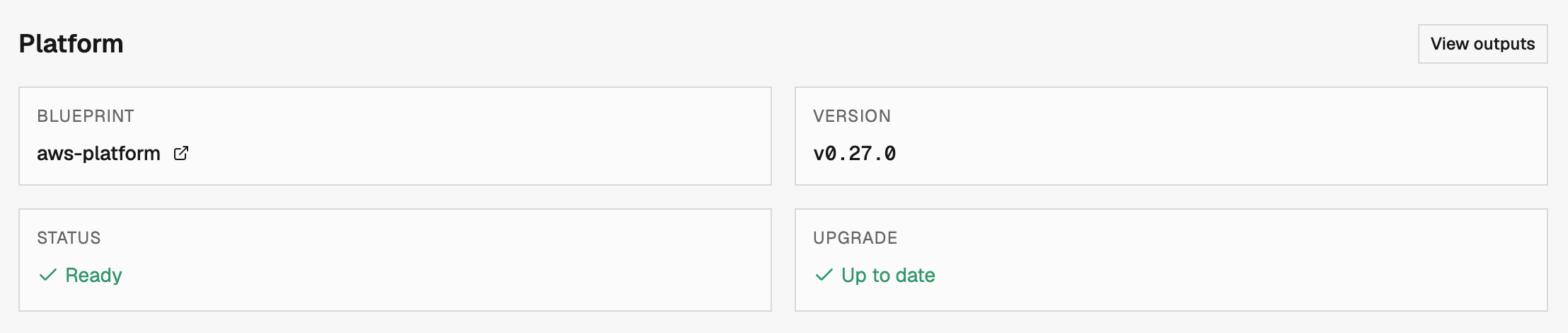
- In Platform outputs, copy Cluster OIDC Issuer URL. This output is available for Ryvn-provisioned AWS, Azure, and GCP environments after the updated platform blueprint and provisioner have been applied. If it is missing, ask your Ryvn administrator to update the environment’s platform blueprint and run provisioning. For a pre-provisioned cluster, ask the cluster administrator for its issuer URL.
- The issuer’s discovery document and public keys must be reachable by Tailscale. Ryvn-provisioned clusters use cloud-hosted issuer endpoints. For a pre-provisioned cluster, your cluster administrator must prepare the cluster for OIDC discovery.
-
In Tailscale Trust credentials, create an OpenID Connect credential. Choose Custom issuer, enter the cluster issuer URL, set the subject to
system:serviceaccount:tailscale-operator:operator, and leave the Audience field blank. -
Grant
Writefor Devices > Core, Services > General, and Keys > Auth Keys, with thetag:k8s-operatortag. Copy the generated Client ID and Audience.
tailscale-operator because that is where this Ryvn blueprint installs the operator. Tailscale generates the client ID and audience before you install the blueprint.
OAuth client secret
- Open Trust credentials in the Tailscale admin console
- Create an OAuth client
- Grant scopes:
- Devices > Core:
ReadandWrite - Services > General:
ReadandWrite - Keys > Auth Keys:
ReadandWrite
- Devices > Core:
- Under Tags, assign
tag:k8s-operator - Copy the Client ID and Client Secret
Step 3: Install the Tailscale Operator blueprint
From the Dashboard
- Go to Blueprints → Marketplace
- Find Tailscale Operator and click Install
- Select your target environment
- Choose OIDC workload identity and enter its Client ID and Audience, or keep the default OAuth client secret and enter its Client ID and Client Secret from Step 2
- Confirm the installation
Via infrastructure as code
For OIDC:Via CLI
For OIDC:For OAuth, store the client ID and secret in an environment variable group and reference them via IaC (
valueFromVariableGroup) rather than passing them inline. OIDC client IDs and audiences are not secrets.Step 4: Enable “Expose to Tailnet” on your database
Once the Tailscale Operator is running, enable the Tailnet toggle on your Postgres blueprint installation.From the Dashboard
- Navigate to your Postgres blueprint installation
- Open the Inputs section
- Set Expose to Tailnet to
true - Save and deploy
Via infrastructure as code
Add theexposeToTailnet input to your existing Postgres blueprint installation:
Step 5: Connect from your local machine
After the deployment completes, your database appears on your Tailnet:- Open the Tailscale admin console → Machines
- Find the new device named
postgres(or similar, based on your installation name) - Note the Tailscale hostname (e.g.,
postgres.your-tailnet.ts.net) - Connect using any Postgres client:
Exposing databases not managed by Ryvn
The Tailscale Operator can also expose hosts outside the cluster, such as an existing RDS or ElastiCache endpoint, as long as the environment’s network can reach them. Add them under External Hosts on your Tailscale Operator installation: each entry is a short name paired with the DNS name to expose, and becomes reachable on your Tailnet as<name>-<environment>.
From the Dashboard
- Navigate to your Tailscale Operator blueprint installation
- Open the Inputs section and find External Hosts
- Add a pair for each host, e.g. key
analytics, valueanalytics.abc123.us-east-1.rds.amazonaws.com - Save and deploy
Via infrastructure as code
analytics-production.your-tailnet.ts.net). Removing an entry and redeploying removes the device.
Troubleshooting
Device not appearing on Tailnet
- Verify the Tailscale Operator installation is healthy in the Ryvn dashboard
- Check the OAuth client ID and secret, or the OIDC client ID, audience, issuer, and ServiceAccount subject
- Confirm
tag:k8s-operatorandtag:k8sare defined in your ACL policy and the operator credential hastag:k8s-operatorassigned
Connection refused
- Ensure your local Tailscale client is connected to the same Tailnet
- Check ACL rules allow traffic from your user/group to
tag:k8sdevices - Verify the database security group allows connections from the cluster’s VPC CIDR (this is configured by default in Ryvn-provisioned environments)
Hostname not resolving
- Enable MagicDNS in your Tailscale admin console if not already active
- Use the full hostname including your Tailnet name:
postgres.your-tailnet.ts.net