

Enterprise software deployment sits on a spectrum of control. At one end, SaaS gives your team control over hosting, releases, and day-to-day operations. At the other, self-hosted and customer-operated on-prem deployments hand those responsibilities to the customer, leaving you with little direct control over the running software.
Bring your own cloud (BYOC) offers a middle ground that combines the strengths of both. Your software runs in the customer’s cloud account, while your team deploys, monitors, and updates it. With agreed permissions, you retain operational control similar to SaaS within the customer’s environment.
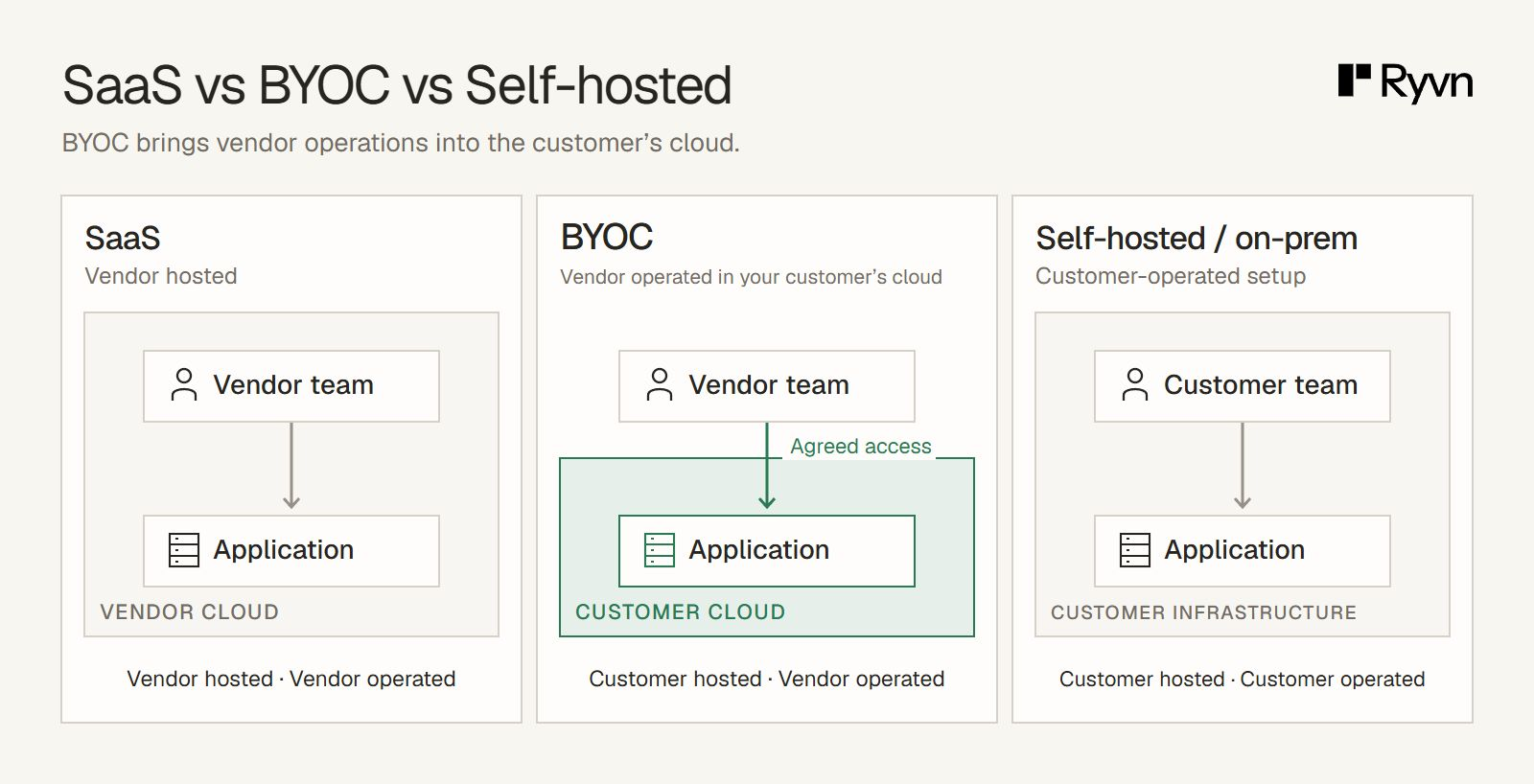
In this guide, we'll compare the four options and what each means for delivering, operating, and supporting enterprise software.
Software deployment models compared: SaaS, BYOC, self-hosted, and on-prem
Here is a quick overview of each deployment model:
| Option | Where the application runs | Who operates it | What to clarify |
|---|---|---|---|
| SaaS | Your hosting environment | Your team | Hosting, access, and data requirements |
| BYOC | The customer’s cloud account | Your team, with agreed access | Permissions, infrastructure duties, and change approvals |
| Self-hosted | Customer-controlled cloud or on-prem infrastructure | The customer | Installation, updates, diagnostics, and support boundaries |
| On-prem | The customer’s physical premises or controlled data center | The customer, your team, or another agreed operator | Operating responsibilities and connectivity restrictions |
In many instances, these deployment models can overlap. We see that often with our clients. For example, a SaaS can use dedicated infrastructure for each customer (single-tenant SaaS) and still be a SaaS. A separate instance in your cloud account does not become BYOC just because it serves one enterprise. Likewise, an on-prem deployment can connect to cloud services. On-prem does not mean air-gapped.
How the deployment models compare in practice
Your deployment model shapes the work your team takes on long after the initial setup. Here’s how the options compare when getting customers live, managing releases, resolving issues, meeting enterprise requirements, and supporting growth.
Implementation: what has to happen before the first customer goes live?
With an established SaaS service, onboarding mostly involves provisioning the customer’s account and setting up integrations.
Deploying into a customer’s environment takes more preparation: you need a repeatable installation package, documented dependencies, and a clear set of supported databases and infrastructure.
With self-hosted delivery, the customer takes on installation, so they need tested instructions and a team ready to operate the software. An on-prem deployment may add hardware setup and a process for obtaining dependencies through restricted networks.
For BYOC, your team needs to agree with the customer on the cloud account, region, networking, and access permissions. Then, once your packages and templates are in place, you can reuse them, while checking permissions, integrations, and security requirements for each customer.
Releases: who approves and applies updates?
With SaaS, your team prepares, schedules, and applies updates in the environment it operates. You can coordinate releases through one process, while accounting for customer integrations, maintenance commitments, and availability requirements.
Self-hosted delivery puts the customer in charge of applying updates. You supply the release and upgrade instructions, but their team decides when to install it. For on-prem installations, the release process depends on who operates the software and how updates reach the environment.
BYOC keeps deployment with your team while the customer retains authority over its cloud account. Your team applies updates through agreed permissions and a deployment approval workflow that gives the client control over and visibility into what is being deployed to their cloud. Instead of spending dev resources figuring out what to install, maintain or migrate, they just click a button to deploy.
Support: who investigates when production breaks?
When a customer reports a bug, your team needs enough information to reproduce it, identify the cause, and confirm that a fix works. The deployment model shapes how much of that investigation you can handle directly and where you need the customer’s help.
With SaaS, you can investigate through your own logs, monitoring, and authorized access to the affected customer’s environment. As you have full control over the infrastructure, it's pretty straightforward.
With self-hosted software, you have to rely on the customer to collect that information, confirm their configuration, and test a fix. Agreeing on supported versions, diagnostic requirements, and escalation contacts in advance helps both teams know what to provide when an issue arises.
For on-prem installations, who handles the investigation depends on the chosen operator, while connectivity determines how your team can access diagnostic information and deliver fixes. An offline environment needs an agreed process for transferring that information and installing verified update packages.
Ultimately, you depend on your client doing the right thing and helping you figure things out.
BYOC reduces those handoffs when your team has the monitoring and permissions needed to investigate directly. You still need to track each installation’s configuration and version, coordinate fixes around its maintenance window, and verify that the update resolves the reported problem, but support and maintenance are within your control.
Compliance: how does deployment affect enterprise approval?
With SaaS, enterprise buyers assess both where your software runs and which companies handle their data. Suitable hosting, controls, and agreements can meet their requirements, but using platforms such as Vercel, Render, or Railway to process personal data can add another sub-processor for the buyer to review.
That review also covers data residency and sovereignty requirements: where data is stored or processed, and which jurisdictional rules apply.
With self-hosted and customer-operated on-prem deployments, you give up some control over updates, configuration, and troubleshooting so the customer can enforce its own security and compliance policies. In return for meeting those requirements, you become more dependent on the customer’s team to maintain and support the installation.
BYOC simplifies enterprise approval by combining SaaS-like control over delivery with deployment inside the customer’s cloud. Your team manages deployments, updates, and support, while the customer governs the environment under its own security and compliance policies. This addresses the hosting requirements that lead enterprises to self-hosted software without handing application operations over to them. Removing separate hosting platforms from the data flow also gives procurement fewer sub-processors to review.
Scalability: can you grow each installation and support more customers?
With SaaS, you scale a service your team already operates. For an application designed to scale, increasing capacity means adding compute, storage, or application instances through your cloud provider. A consistent deployment and operations process lets you support more usage and more customers without rebuilding the setup each time.
With self-hosted and customer-operated on-prem deployments, those changes depend on the customer’s team. You recommend the resources or configuration needed, then wait for them to implement and test the changes. On-prem growth may also require buying and installing hardware. Troubleshooting capacity problems becomes a back-and-forth between teams, consuming time on both sides.
Customers also upgrade on different schedules. Over time, you can end up with nearly as many production versions as customers, each with its own configuration. Every fix or capacity change then needs checking against those differences, making maintenance more demanding as your customer base grows.
BYOC brings the SaaS operating model into the customer’s cloud. With standardized deployments and automation, your team provisions capacity, monitors installations, and manages upgrades through a common process, within agreed permissions and maintenance windows.
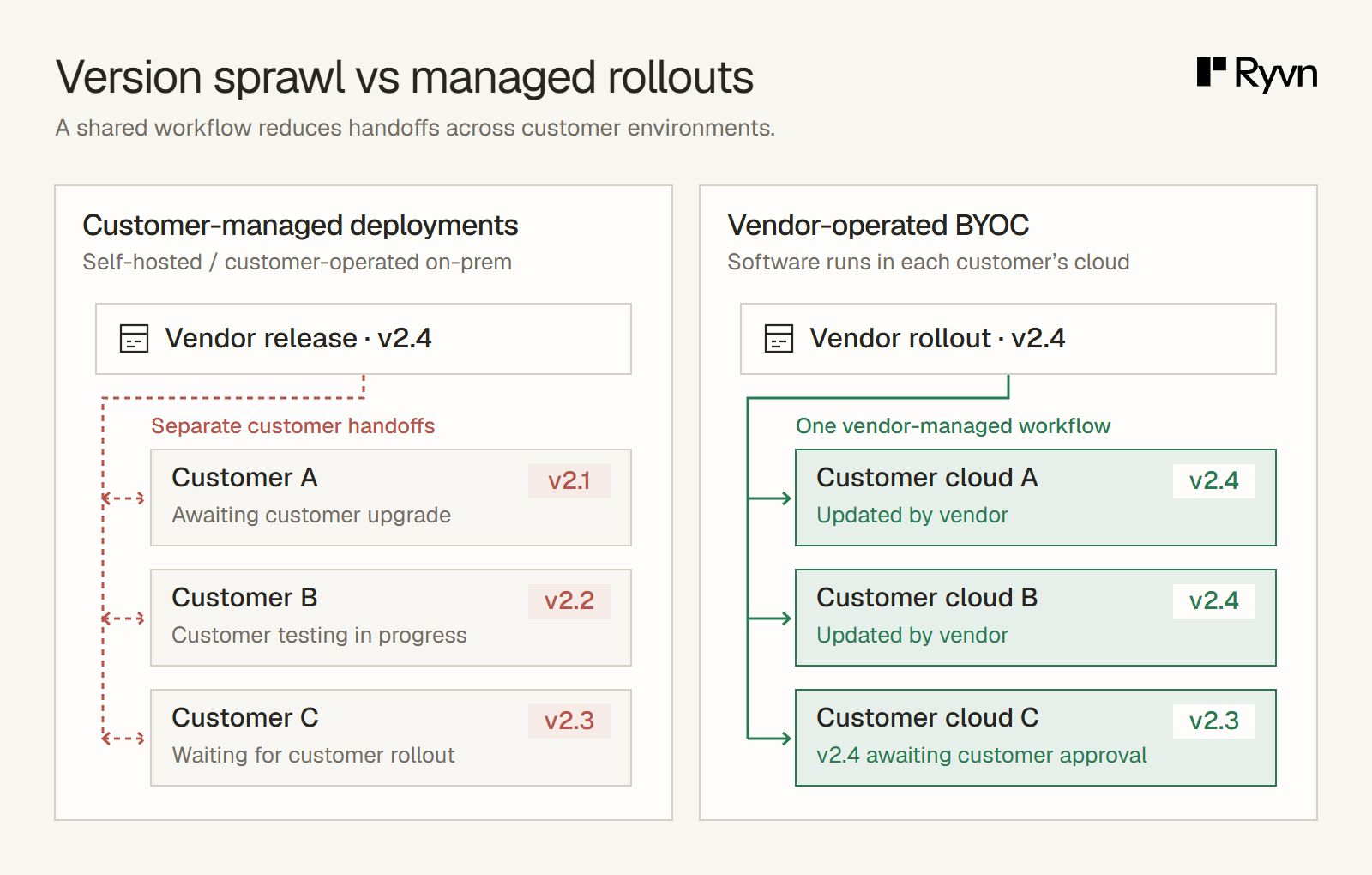
Customers retain the cloud ownership and governance controls they seek from self-hosting, while you handle the application’s growth and upkeep. More consistent environments and fewer troubleshooting handoffs reduce coordination for both teams, giving customers a smoother experience without making them responsible for operating your software.
Illustrative versions: BYOC gives your team a shared rollout process and visibility across customer environments, while preserving customer approval and update schedules.
Which deployment model should you offer?
For enterprise customers who want control of their cloud environment and a managed service, BYOC offers the best of both worlds. You retain SaaS-like control over delivery and operations, while the customer owns the cloud account and sets its governance policies.
We see this often with our clients: enterprise buyers who initially ask for self-hosted or on-prem deployment are open to BYOC when it meets the requirements behind that request. Many of the software vendors we work with are moving existing customer deployments from self-hosted delivery to BYOC.
The appeal is practical for both teams. Customers no longer have to implement every update or investigate every issue themselves. Your team can manage releases, monitor installations, and resolve problems directly through agreed access. That reduces the engineering time spent coordinating fixes and makes day-to-day operations simpler for everyone.
It also creates a more consistent approach to security. A common release and monitoring process helps your team keep patches current and track what is running across customer environments. Scoped permissions and deployment approvals keep that work within the customer’s access and change policies.
When a buyer asks to self-host, make BYOC part of the conversation. It gives them a way to retain control of their environment while handing the operational work to the team that knows the software best.
Offering SaaS and BYOC together
You can offer SaaS and BYOC side by side: SaaS in your cloud account, BYOC in the customer’s. Shared deployment tooling lets your team provision, monitor, and update both through a common workflow.
You effectively keep one codebase and release process, with configuration for each environment’s infrastructure, integrations, permissions, and approval policies.
Your SaaS customers continue using the hosted service, while enterprises that require their own cloud account get the same product deployed there.
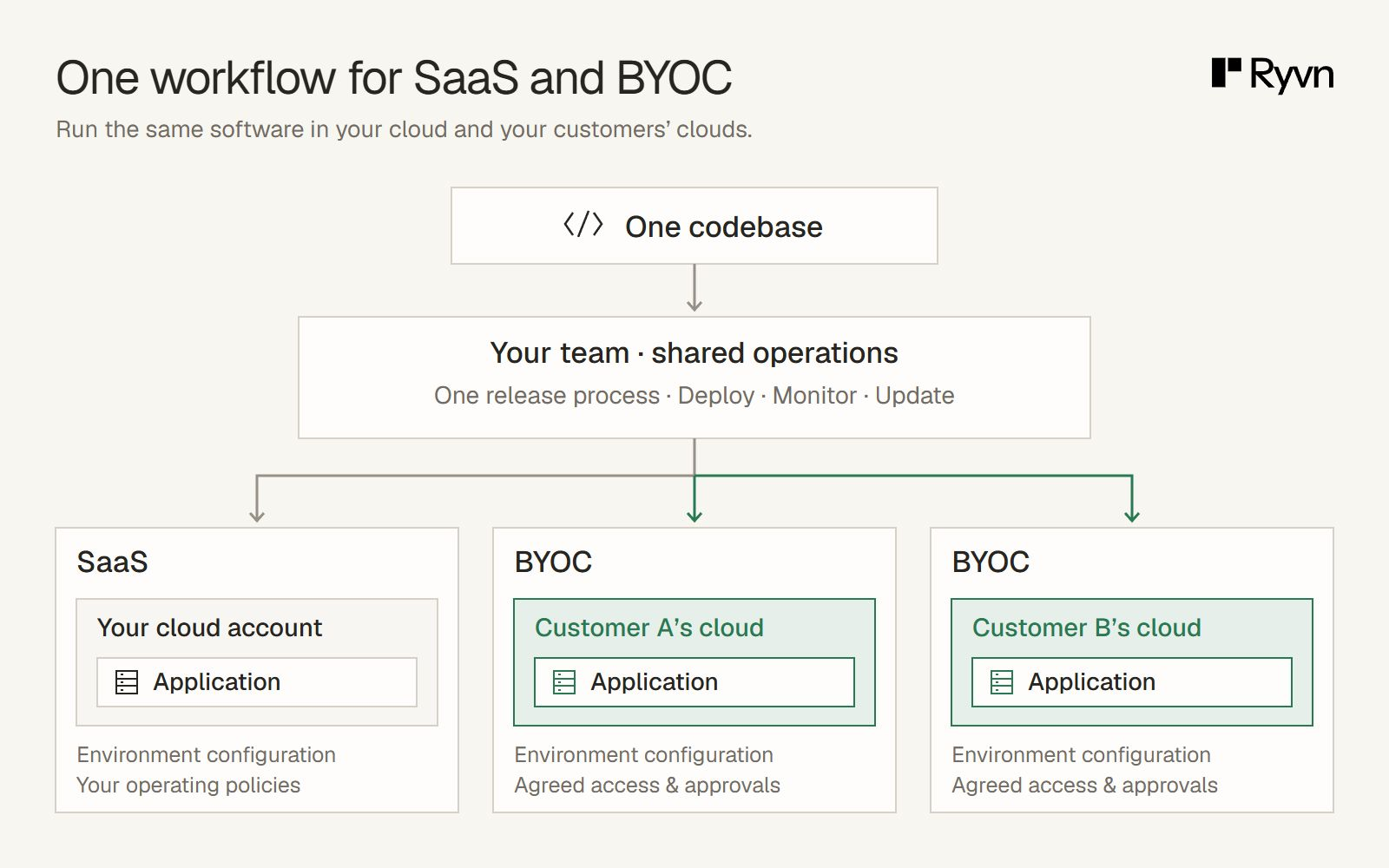
Both groups rely on your team to operate it, giving you a way to serve different enterprise requirements through a shared approach to software delivery.
Operating customer-cloud deployments with Ryvn
Ryvn gives your team a single control plane for deploying and operating software in your own cloud and your customers’ accounts. It supports AWS, GCP, and Azure, and works with existing Dockerfiles, container registries, and Helm charts.
Your team can provision infrastructure, roll out releases, and track deployment history across environments. Centralized logs and metrics give you visibility into customer installations so you can investigate issues directly. Health checks and rollbacks help you manage changes through the same workflow.
You can also configure deployment approvals so designated reviewers from your team or the customer’s team inspect changes before they run. Roles and approval policies determine who can act, keeping daily operations aligned with each customer’s requirements.
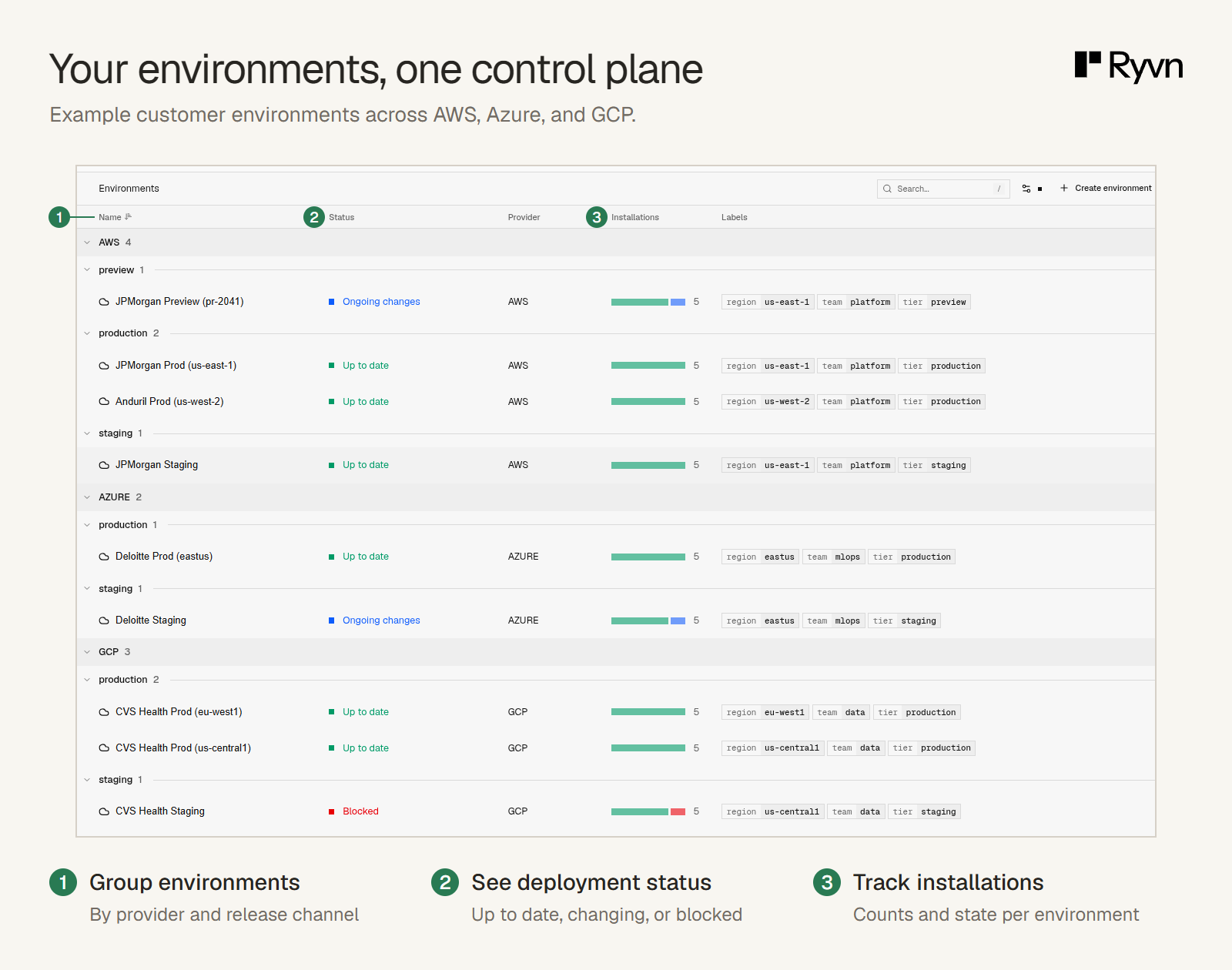
Illustrative customer environments in Ryvn, grouped by cloud provider and release channel, with deployment status and installation summaries.
Book a demo to discuss your existing stack and how Ryvn can support your enterprise deployment requirements.