

Nobody seems to agree on what “private SaaS” means, and there is a good reason for that: private SaaS can refer to three different deployment models:
- dedicated instances, where the software stays in the vendor’s cloud but is isolated from the other instances
- self-hosted, with customer-operated deployments directly in the customer’s cloud
- BYOC (bring your own cloud), with vendor-operated deployments inside the customer’s cloud
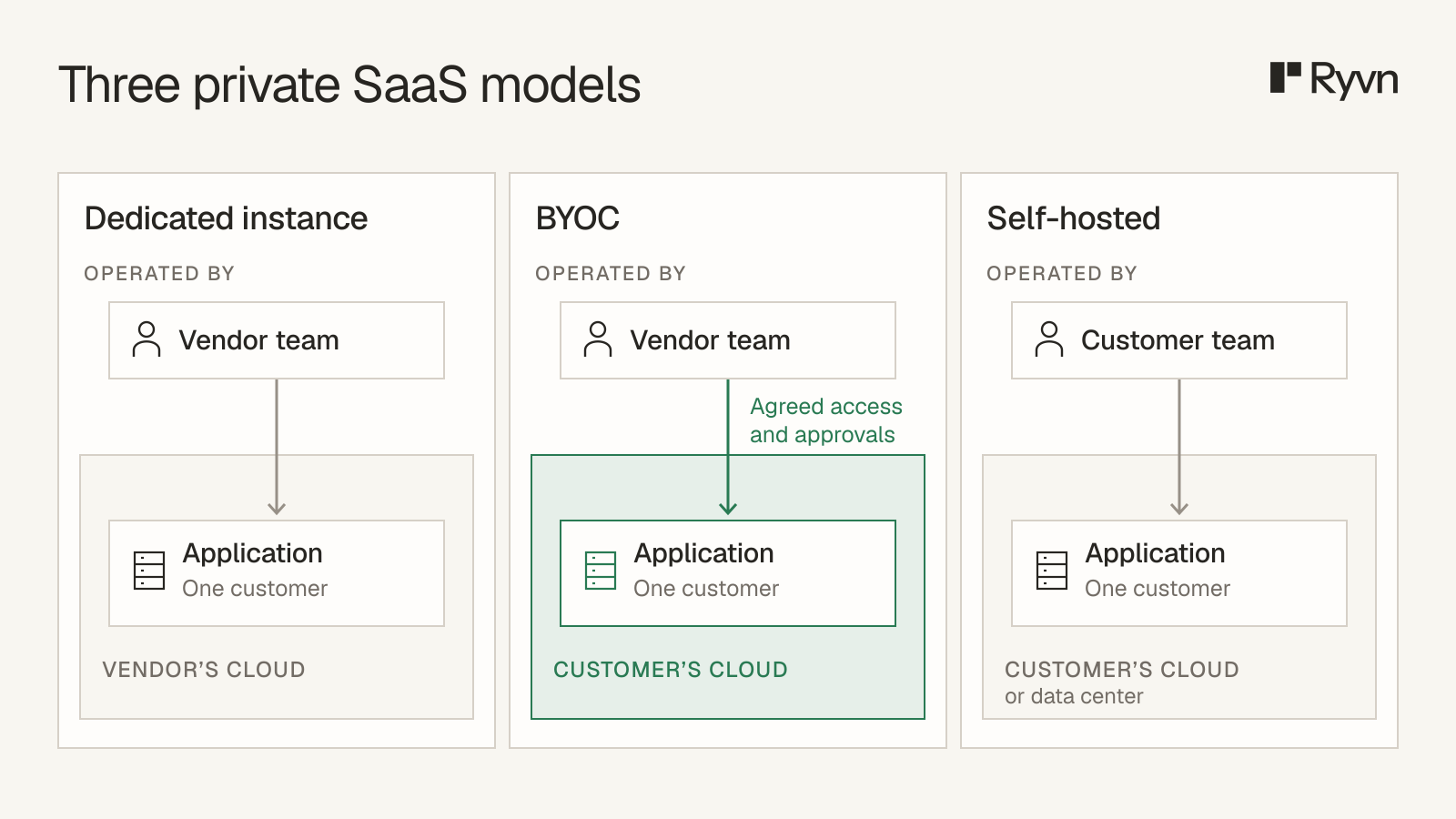
At Ryvn, we help vendors deploy and operate their software in their customers’ clouds using the BYOC model.
The reason is simple: BYOC offers the best of both worlds. Customers keep the software and application data in their own cloud, while vendors retain SaaS-level control over operations directly inside that environment, within agreed permissions and approval rules.
In this article, we’ll go over what exactly private SaaS means: we’ll explore the different deployment models, why enterprise customers are asking for it and what to do when an enterprise client is asking for private SaaS.
What are the types of private SaaS?
It all comes down to these two questions:
- Does the software run in the vendor’s cloud or the customer’s?
- Who controls deployment, updates, and day-to-day operations?
As we saw earlier, there are three different deployment models that are all considered “private SaaS”:
| Model | Where does the software run? | Who controls deployment, updates, and operations? |
|---|---|---|
| Dedicated instance | Vendor’s cloud | Vendor |
| BYOC | Customer’s cloud | Vendor, within agreed permissions and approval rules |
| Self-hosted | Customer’s cloud or data center | Customer, with vendor support |
Vendors running single-tenant or multi-tenant instances in their own clouds often come to us when a client asks them to deploy in the client’s cloud.
That was the situation for Clearly AI, a platform for security and privacy assessments. A global automotive manufacturer required Clearly AI’s entire stack to run in the manufacturer’s AWS account to meet its data sovereignty policies. Clearly AI wanted to meet that requirement while retaining control over updates and operations.
Here’s how the three models applied:
- Dedicated instance: Clearly AI already ran isolated environments in its own AWS account. That setup could not satisfy the manufacturer’s requirement.
- Self-hosted: The manufacturer’s IT team could deploy and operate the software, but Clearly AI would lose control of update timing and face lengthy troubleshooting calls over misconfigurations.
- BYOC: Clearly AI could operate the software in the manufacturer’s account. Its first attempt stalled for two months while it sought corporate laptops, VPN access, and privileged AWS roles. With Ryvn, the customer ran a CloudFormation template and configured private DNS. Clearly AI could then manage updates, monitoring, and configuration without holding customer AWS credentials. Users were accessing the application in just two days after Ryvn onboarding.
Private SaaS vs SaaS: what’s actually different?
Moving from standard SaaS to a private deployment changes more than where the software runs. It also affects how resources are shared, who manages updates, and who pays for the infrastructure.
Standard SaaS typically uses a multi-tenant architecture: many customers share application infrastructure that the vendor operates. Sharing resources can reduce costs and simplify management.
Private SaaS gives each customer a dedicated application environment. Separating customer environments can support stricter isolation requirements and reduce the impact of a failure within one customer’s deployment, but it adds infrastructure and management overhead.
| Multi-tenant SaaS | Private SaaS | |
|---|---|---|
| Tenancy | Shared infrastructure | Dedicated resources |
| Cloud account | Vendor’s | Vendor’s or customer’s |
| Connectivity | Public or private | Public or private |
| Updates | Vendor-managed | Vendor- or customer-managed |
| Cloud cost | Shared across customers | Dedicated to one customer |
Cloud platforms also offer private connectivity, so customers can access a vendor’s service from their own virtual network without sending that traffic over the public internet. AWS provides AWS PrivateLink, Azure offers Azure Private Link, and Google Cloud offers Private Service Connect.
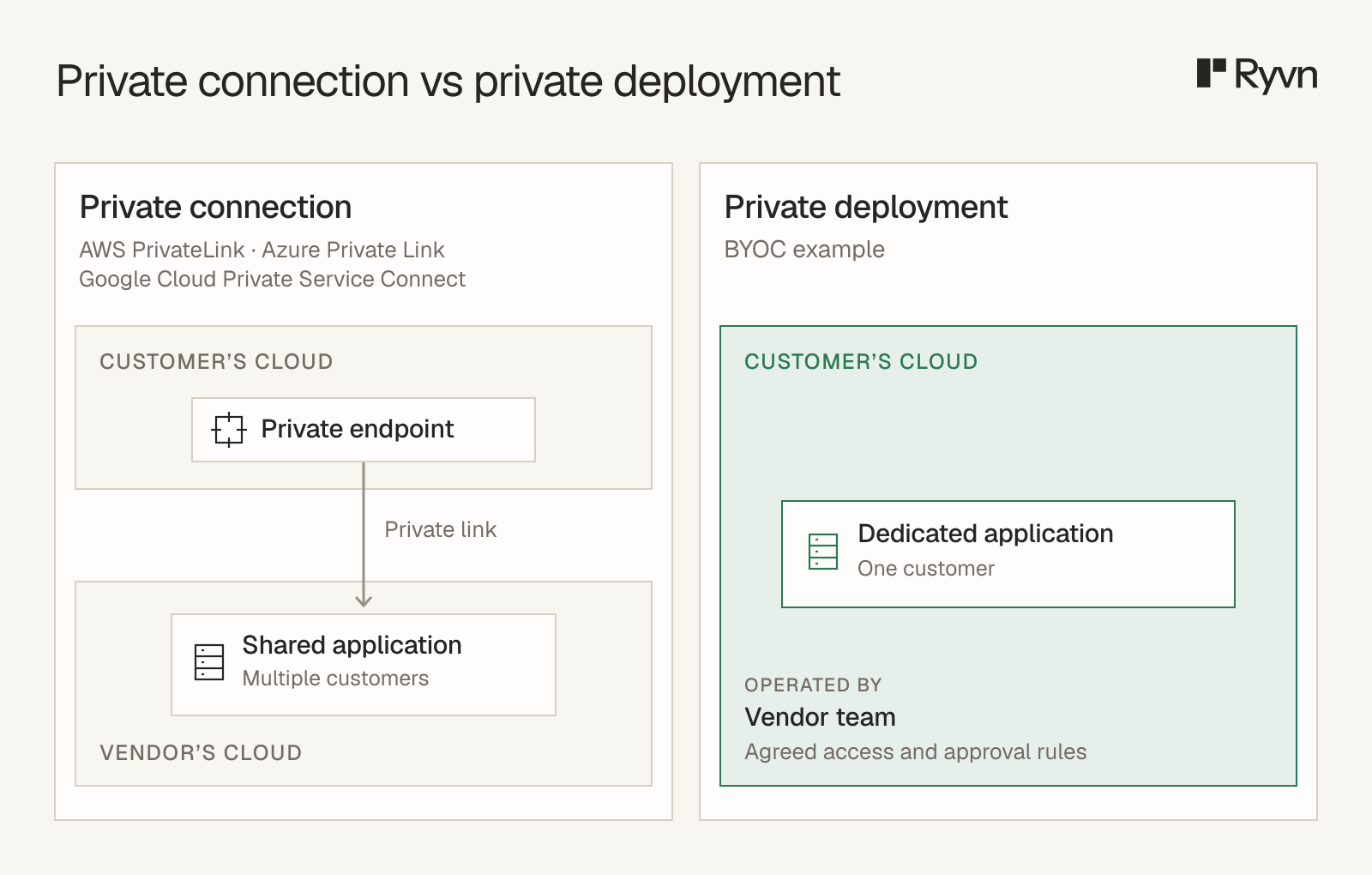
When a vendor makes its service available through one of these options, it can continue to host and operate the application in its own cloud environment. The application can still serve multiple customers on shared infrastructure, so private connectivity alone does not make it private SaaS.
Why do enterprises ask for private SaaS?
Data residency and compliance are the main reasons enterprises ask for private SaaS. They need to control where sensitive data is stored and processed, who can access it, and how that access is recorded. Regulations, customer contracts, and internal security policies set the requirements that a deployment must meet before the security team approves it.
Private deployments give enterprises a dedicated environment in which to enforce those requirements. With BYOC or self-hosting, the application also falls under the customer’s existing cloud security policies and tools.
The customer selects approved regions, controls network access, and defines the vendor’s permissions. Compliance depends on how these controls are implemented and verified, alongside the location of the software.
Infrastructure costs provide another reason to choose BYOC, particularly for compute-heavy products. The customer pays for compute and storage through its existing cloud agreements, using the discounts that apply to those services.
What does offering private SaaS commit you to?
Offering private SaaS means supporting a separate deployment for each customer, either by operating it yourself or helping their team run it.
Dedicated instance in your cloud
- Installation: You provision a separate environment with your existing tools. Each customer adds infrastructure to monitor and pay for.
- Updates: You apply releases and rollbacks. Customer-specific release schedules can leave you supporting multiple versions.
- Troubleshooting: Your team monitors each deployment and investigates incidents directly, using the logs and infrastructure access it controls.
Customer-operated install
- Installation: You provide an installation package and instructions. The customer configures and runs it in their cloud or data center.
- Updates: You publish releases and upgrade instructions, and the customer applies them. Your team may need to support older versions and different configurations.
- Troubleshooting: You work with the customer’s IT team, using the logs and diagnostic access they provide. Fixes may depend on them running commands or changing configuration.
Vendor-operated BYOC
- Installation: You deploy into the customer’s account using the permissions and network access they allow. Your tooling has to work within those restrictions.
- Updates: You apply releases and rollbacks, subject to any customer approval requirements or maintenance windows. Urgent security patches need an agreed process too.
- Troubleshooting: You investigate incidents through the monitoring and diagnostic access the customer permits. Getting extra logs or permissions may require their involvement.
What should you do when an enterprise customer asks for private SaaS?
Before proposing a deployment model, clarify exactly what the customer means by “private SaaS.” Ask where the software must run, what isolation and network access they require, and who will control updates and operations. Then use the table below to match their requirements to the right deployment option.
| If the customer needs... | Offer | Why |
|---|---|---|
| Isolation and a smaller blast radius, with no requirement about whose account it runs in | Dedicated instance | A dedicated instance reuses your existing stack, supports strict compliance requirements, and limits the impact of failures to one tenant. |
| The software in their own cloud account or VPC, without running it themselves | Vendor-operated (BYOC) | Your software runs in their cloud while you retain control over the release cycle. |
| To use up an existing cloud commitment or avoid egress fees | Vendor-operated (BYOC) | Customers can count eligible compute spending toward their cloud commitments, and data-heavy products avoid egress. |
| A private network path, with no residency or account requirement | Multi-tenant SaaS over private connectivity | This is the cheapest answer, and it’s still multi-tenant. |
| No inbound vendor connections | BYOC with Ryvn or a customer-operated install | Ryvn’s agent pulls deployment tasks over outbound HTTPS and runs them with scoped permissions; customers can approve changes before execution. This supports BYOC when the restriction is on inbound vendor connections. If the policy also forbids vendor-directed operations through an agent, use a customer-operated install. |
Software and support fees are separate from the cloud bill. For a dedicated instance in your account, the infrastructure costs fall to you. With BYOC, the customer typically pays the cloud provider.
Customer-operated installs leave daily operations with the customer. With vendor-operated BYOC, your team does that work, which needs to be covered by your software or service fee. Support hours and incident response times should also be explicit.
How do vendor-operated BYOC deployments work?
Vendor-operated BYOC gives customers software in their own cloud while your team keeps running it. You handle releases and troubleshooting directly, under the access and approval rules you agree with the customer.
We built Ryvn so you can manage deployments, updates, and monitoring across customer clouds from one place. Our management service, the Hub, coordinates changes, and the Ryvn Agent, a program in the customer’s cloud, implements them.
- The vendor prepares the change. You send the Hub deployment configuration, such as Helm charts or Terraform modules. With approvals enabled, an authorized reviewer sees what will change and approves it before execution. This also applies to rollbacks.
- The agent applies the change. It checks the Hub for tasks over an outbound HTTPS connection, carries out the deployment, and reports status. The Hub doesn’t open an inbound connection to the customer’s network.
- The vendor monitors the deployment. You can see deployment status and application health. Logs go to Ryvn’s systems by default, with options for vendor-hosted storage or transfer from the customer’s environment only when needed.
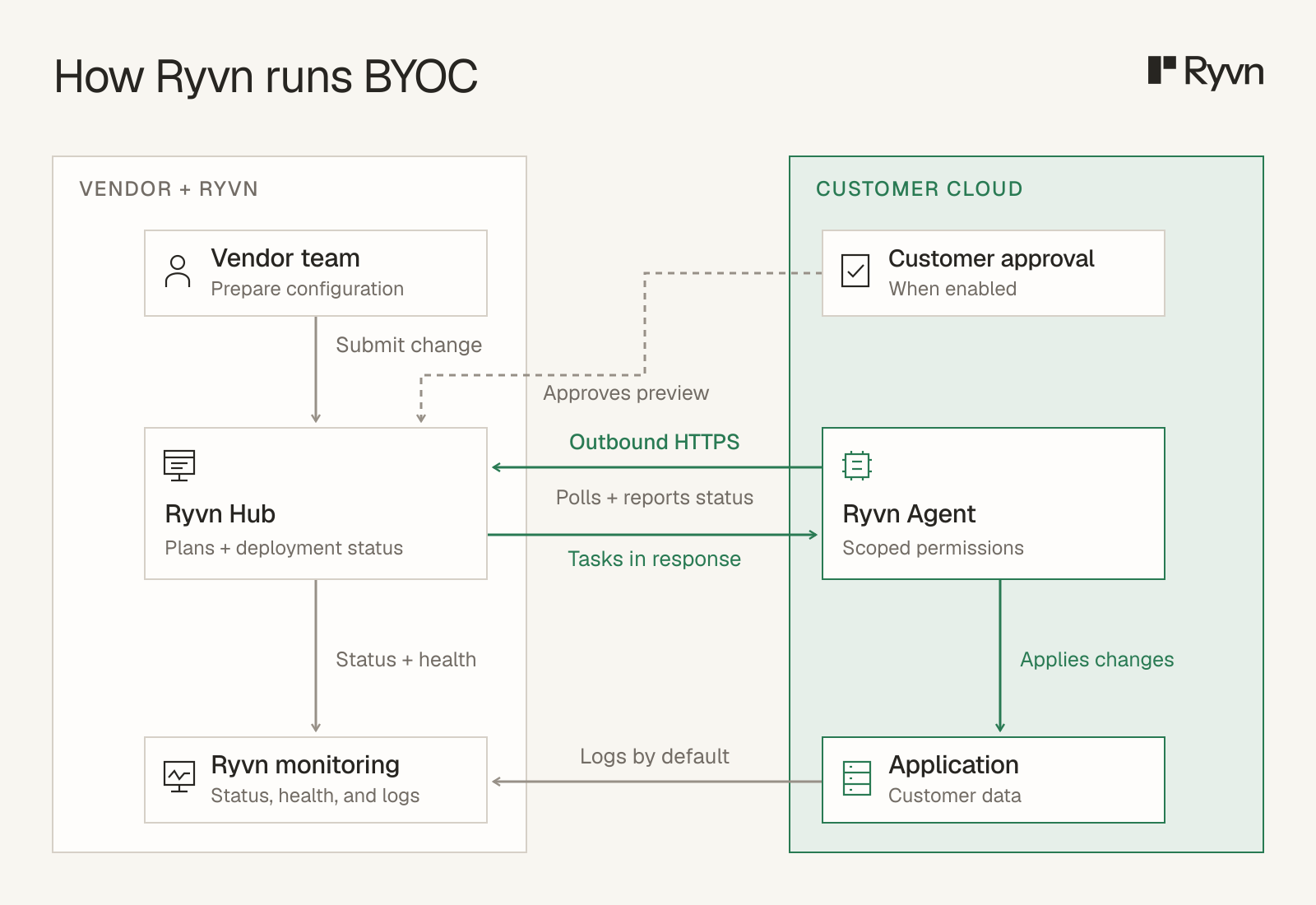
For Clearly AI, the customer ran a CloudFormation template to set up a Kubernetes cluster and install the agent, then pointed private DNS at the app. Clearly AI could then manage releases through Ryvn without holding AWS credentials.
If a customer needs your software in its own cloud, talk to us about Ryvn. We’ll review your architecture and the customer’s requirements to show how the deployment would work.
FAQs
- Is private SaaS the same as BYOC? No. In this article, BYOC means software running in the customer’s cloud account and managed by the vendor. Private SaaS also includes dedicated instances in the vendor’s account.
- Is a single-tenant instance private SaaS? Yes. A dedicated instance in the vendor’s account is one type of private SaaS. It gives one customer dedicated resources while the vendor hosts and operates the software.
- Is private SaaS the same as on-prem? No. On-prem means the software runs in the customer’s own data center. The customer might operate it themselves or have the vendor manage it. Private SaaS can also run in a cloud account.
- Does private SaaS mean the vendor can’t access my data? No. Access depends on the permissions granted to the vendor and how the application handles data. A private deployment can still allow vendor operation and data collection under agreed controls.
- Who pays the infrastructure bill? Typically, the account holder pays the cloud provider. The agreement should separate infrastructure costs from software and support fees.
- Can a customer approve releases while the vendor operates the software? Yes. With approvals enabled, Ryvn requires review before changes run, including rollbacks. Customers can review changes through a role limited to their environment. Ryvn’s customer-stacks portal is in beta.
- Can a vendor offer SaaS and private SaaS from the same codebase? Yes. Vendors can share application code while using different deployment configurations for their SaaS and customer-hosted installations.