
Enterprise Software Deployment: What You Need to Close the Deal
 Albert LamCo-founder & CEO
A long enterprise sales process can take up a lot of your engineering team’s time. Deployment discussions alone can involve decisions about:
- Shared hosting, a dedicated instance, or the customer’s own cloud.
- Data storage and connections to outside services.
- User sign-in and vendor access.
- Update approvals, monitoring, and support.
- The evidence needed for security review.
Those decisions affect what you’ll have to build and how you’ll support the customer after the sale.
At Ryvn, we help software vendors deploy and operate applications in their customers’ clouds. We’ll explain how to work through these requirements so you can make commitments your team can deliver on and get the deal closer to signing.
Open the deployment worksheet to record your answers.
What is enterprise software deployment?
Enterprise software deployment is getting software running for a large organization in line with its requirements: where the software is hosted, who can access it, how it’s updated, and what evidence shows it’s secure.
For a SaaS vendor, it means agreeing with the buyer on a setup and then delivering and operating it. The setup can be your existing multi-tenant product, a single-tenant instance, an installation in the buyer’s own cloud account, or an on-premises or air-gapped install that the buyer runs. Each one changes what your team builds and supports after the contract is signed.
What does each deployment option mean for your team?
Each option comes down to two decisions: where the software runs, and who operates it after installation. Operating it means applying updates, watching for failures, and fixing problems.
| Deployment option | Where it runs | Who operates it | What it adds for your team |
|---|---|---|---|
| Shared SaaS (multi-tenant) | Your cloud account | Your team | Little new work. You answer security questions about the service you already run. |
| Dedicated instance (single-tenant) | Your cloud account | Your team | Provisioning, upgrading, monitoring, and paying for a separate stack for each customer. |
| Vendor-operated customer-cloud deployment (BYOC) | The buyer’s cloud account | Your team | An install in an account you don’t own, an approved access path, and releases shipped to each buyer’s environment. |
| Customer-operated installation (self-hosted, on-premises, or air-gapped) | The buyer’s cloud account or data center | The buyer’s team, with your support | Packaged releases, install documentation, and support for problems you can only see through the buyer’s team. |
A single-tenant instance runs a separate copy of the application for one customer. That copy can use its own database or share one with other customers, depending on how strictly the buyer wants to separate its data.
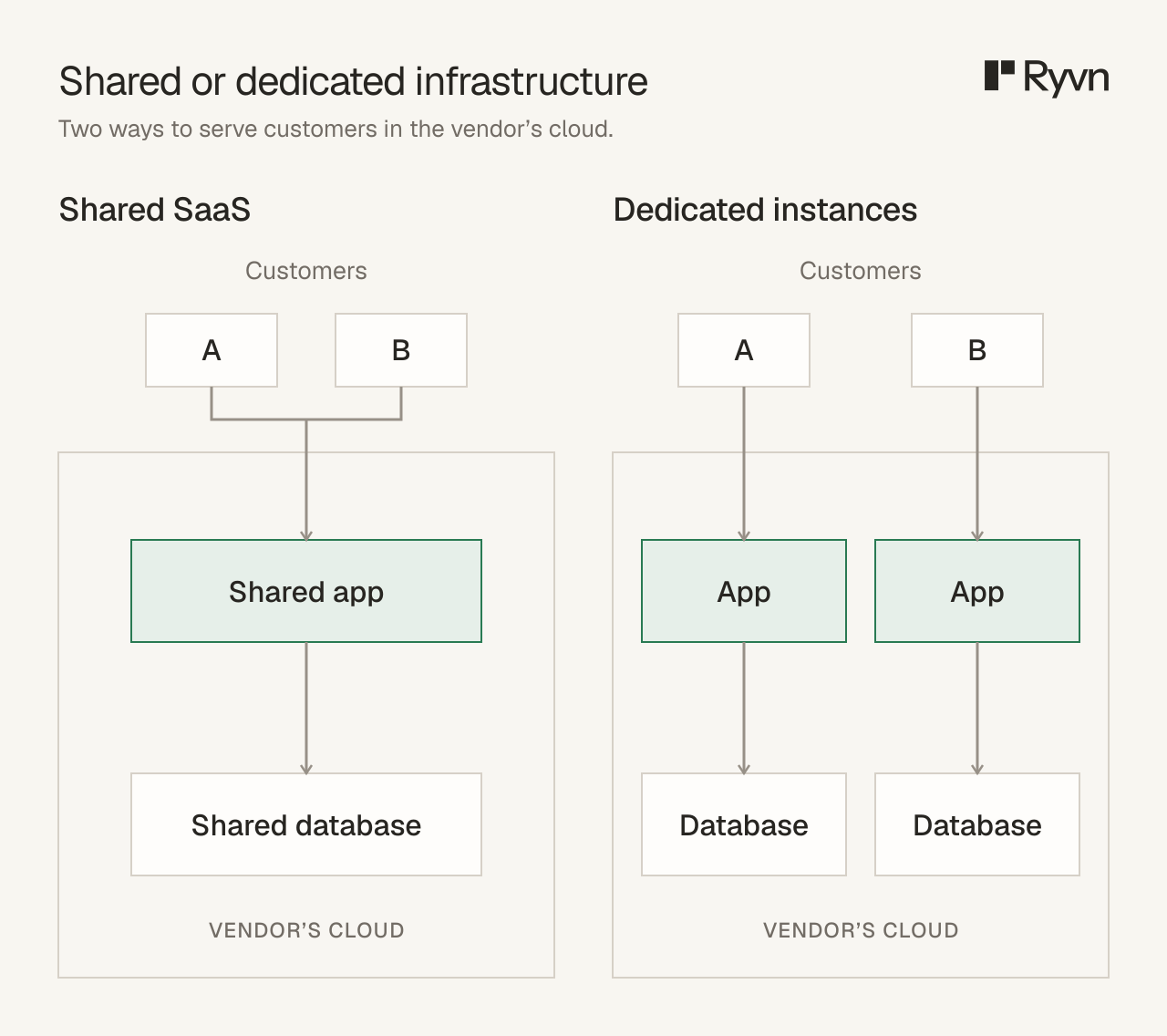
One possible dedicated setup, with a separate application and database for each customer.
The last two rows both put the software in the buyer’s environment. The difference is who runs it day to day, which we cover in Self-Hosted vs BYOC.
What will enterprise buyers ask for before signing?
Most of these requests arrive in security questionnaires, long lists of questions about your security controls and how you run the service. Enterprise security teams send them as part of vendor due diligence, before procurement signs off. The questions fall into eight areas.
Running the application in the buyer’s cloud account answers some of them, while others remain untouched. The table below shows which, and the sections after it cover each question in turn.
| Buyer question | What to have ready | Does running in the buyer’s cloud answer it? |
|---|---|---|
| Where will our data go? | The account and region, plus a data-flow diagram covering backups, logs, and external APIs | Partly. The application and database stay in their account. Logs, error reports, and API calls still need checking. |
| Can it work within our network and access rules? | A network diagram and a list of the permissions your team needs | Partly. Their network controls apply, but you still need an approved way to deploy and support the application. |
| Can employees use our company login? | SAML or OIDC single sign-on, SCIM provisioning, and role mapping | No. SSO is product work wherever the application runs. |
| Can we review and export audit logs? | Application audit events, export, and retention settings | No. Cloud and deployment logs don’t record what users did inside your application. |
| Can we approve updates before they go live? | Change previews, an approval step, rollback, and a patch process | No. Approvals need deployment tooling and an agreed policy. |
| Who holds the encryption keys? | Encryption in transit and at rest, and support for customer-managed keys | Mostly. Keys can live in the buyer’s own key service. |
| Who handles incidents, recovery, and exit? | On-call owners, backup and restore, data export, and offboarding steps | No. Where the software runs doesn’t determine who is responsible. |
| What security evidence can you provide? | Questionnaire answers, a SOC 2 report, a penetration-test summary, and a subprocessor list | Partly. Some answers move to the buyer’s cloud provider, and you need a written split of responsibilities. |
Where will our data go?
Regulated buyers usually name a region for their data, a requirement often called data residency. It covers backups as well as the primary database. Some buyers go further and require the application and database to run in their own cloud account.
Running in the buyer’s account settles where the application and database live. Copies of customer data can still leave the application through:
- Error reports sent to a tracking service, which can include sensitive information from requests.
- Logs shipped to your observability tools.
- Requests to external APIs, including prompts sent to a model provider such as OpenAI or Anthropic.
Each destination has to meet the buyer’s region requirement or be removed from the deployment. A data-flow diagram shows the buyer where data is stored and which services receive it.
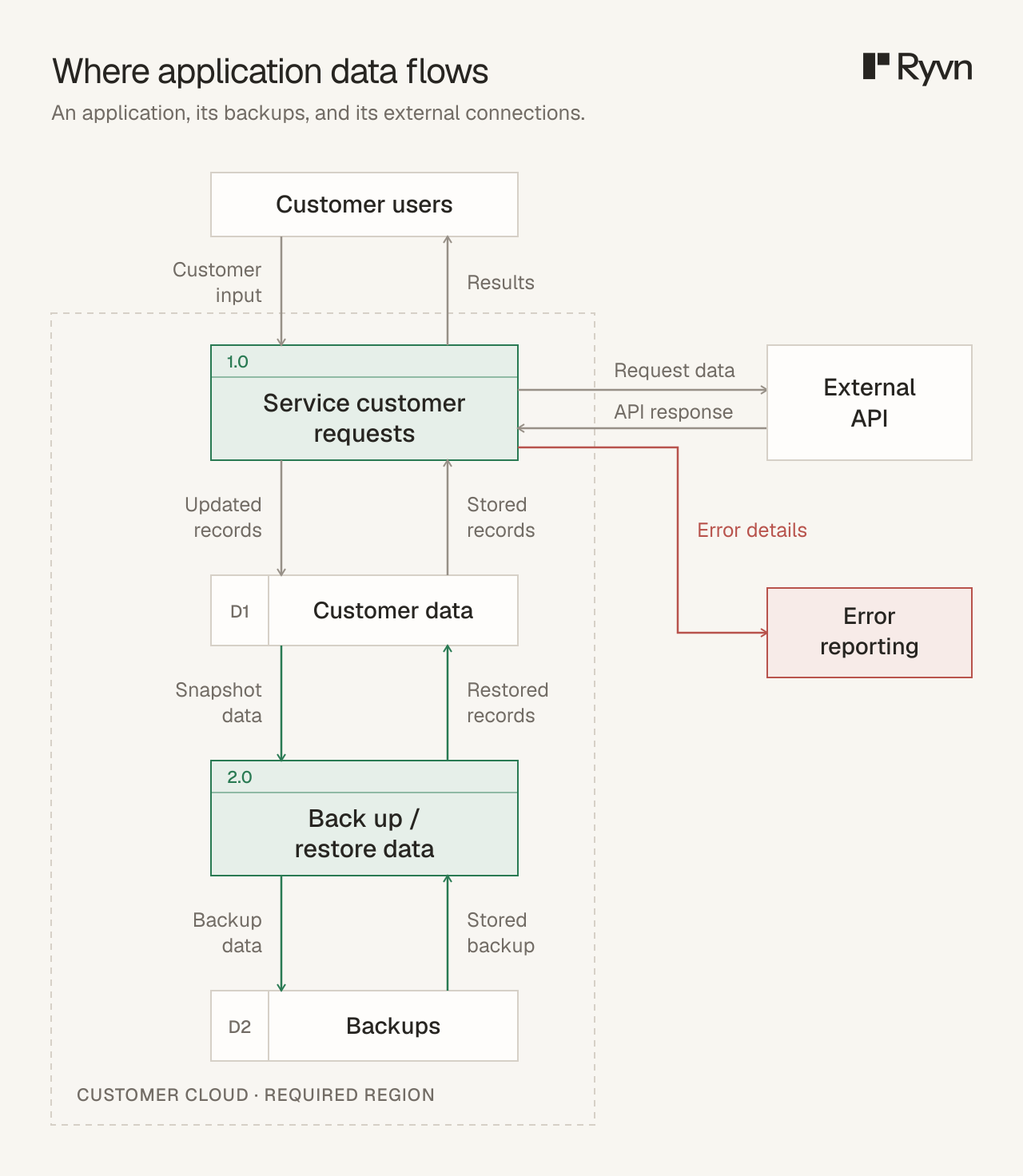
Illustrative data-flow diagram for an application with backups and external services. The dashed line marks the customer account and required region.
Can it work within our network and access rules?
Buyers often use network access controls to limit who can reach the application and restrict which outside services it can call. Any external service your product depends on has to be on their allowlist.
Your team also needs a way to install and maintain the application.
Clearly AI, which sells security and privacy assessment software, ran into this with an automotive manufacturer. The manufacturer’s data policies required Clearly AI’s whole stack in the manufacturer’s AWS account. Clearly AI’s first approach needed corporate laptops, VPN access, and sign-off on privileged AWS roles, and two months later the application still wasn’t deployed.
With Ryvn, the manufacturer ran a CloudFormation template in its own account, and Clearly AI never received AWS credentials. From Ryvn onboarding to end users accessing the application took two days.
A network diagram and a permission list turn the access question into a request the buyer’s security team can review. They show which connections are open, in which direction, and what each permission lets your team change.
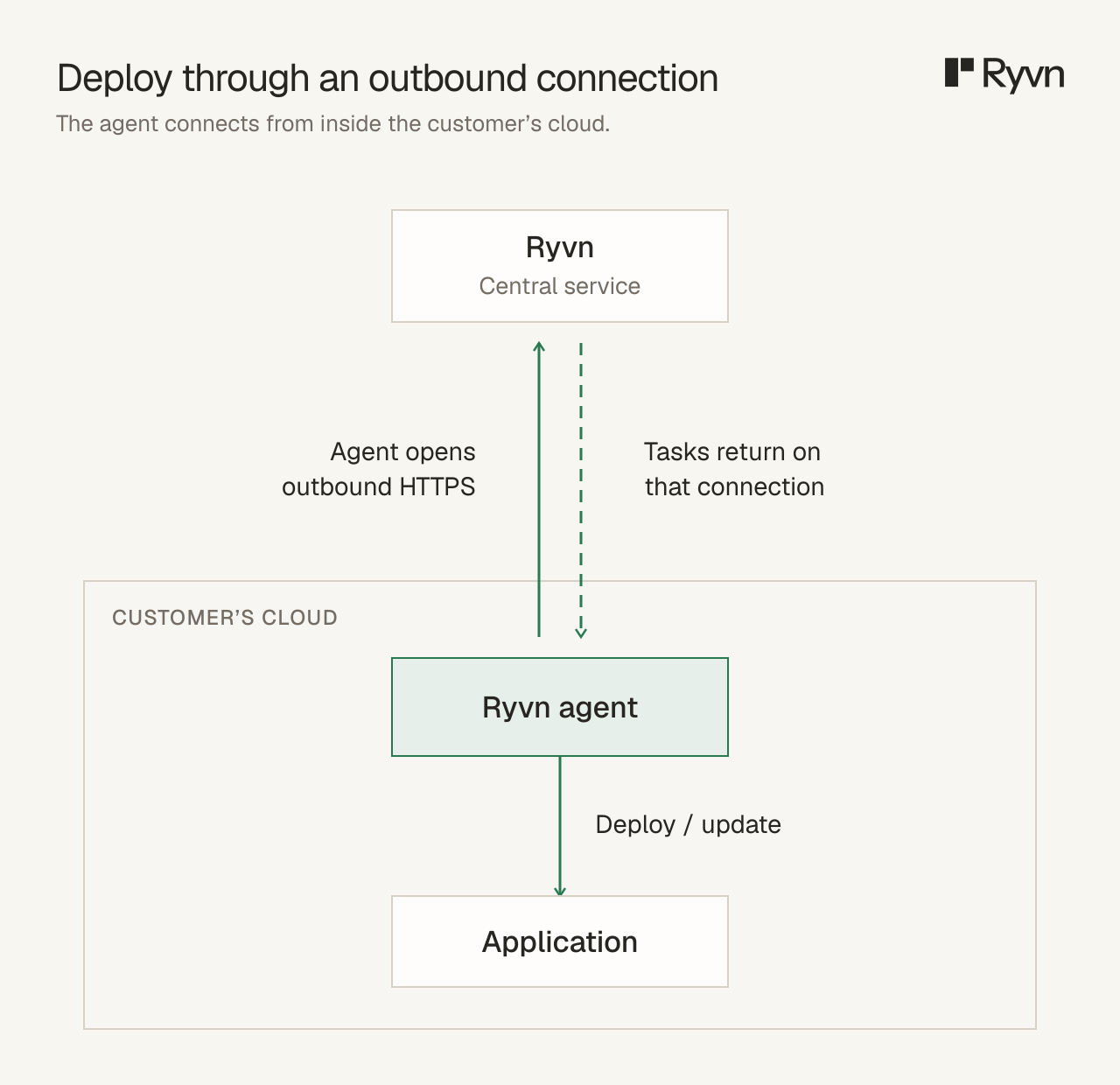
A Ryvn agent inside the customer’s account checks for tasks over an outbound connection. The arrows show management traffic.
Can employees use our company login?
Enterprise buyers expect employees to sign in with the company login they use for every other work application. This is single sign-on (SSO), usually over SAML or OIDC, connected to an identity provider such as Okta or Microsoft Entra ID.
Buyers also want accounts created and removed automatically when someone joins or leaves. That is usually done with SCIM provisioning, along with roles mapped from groups in the identity provider. Make sure you build this capability!
Can we review and export audit logs?
Security teams use audit logs to investigate security incidents by checking who accessed data or changed a setting. Each entry records who acted, what changed, when it happened, and whether it succeeded. Buyers often ask to export these records to their own log system and keep them for an agreed period.
A customer-cloud deployment produces two other kinds of record. The buyer’s cloud provider logs activity in the account, and deployment tooling can log each change your team makes.
Can we approve updates before they go live?
Change-controlled buyers want to see an update and sign off before it’s applied. A change preview shows the proposed version and any infrastructure changes. An approval step holds the deployment until someone on the buyer’s side approves it.

Example in Ryvn: the preview lists changed resources and waits for approval.
Larger buyers also ask for a staging environment in their account to test a release before it reaches production, a way to stay on a pinned version, and a tested rollback. Before go-live, agree on:
- Who can approve changes on each side.
- Maintenance windows, if the buyer uses them.
- How urgent security patches are handled.
Patch management needs its own agreement because approval applies to security patches too. In Ryvn, once approvals are switched on, force deploys and rollbacks also wait for approval, and pending approvals don’t expire.
Who holds the encryption keys?
Buyers ask how you handle data encryption, in transit and at rest. On a typical cloud stack, the answer is TLS for connections and the provider’s encryption for disks, databases, and object storage.
Many enterprises want customer-managed keys, created in their own key service such as AWS KMS, so they can revoke access to their data.
In the buyer’s cloud account, the keys can live in the buyer’s own key service, and your application uses them through permissions the buyer grants.
Who handles incidents, recovery, and exit?
Buyers want an incident response plan with named owners for when something goes wrong:
- Who gets alerted when the application fails, and how quickly your team responds.
- Who restores data from backups, and how recent they are.
- How a security incident is reported to the buyer.
Buyers also ask about exit: how they get their data out and how your access is removed if they stop using the product. In a customer-cloud deployment, the data already sits in their account, so the exit plan covers removing your team’s permissions and deciding who runs or retires the application afterward.
What security evidence can you provide?
Many buyers send a standard security questionnaire, such as Shared Assessments’ SIG or the Cloud Security Alliance’s CAIQ. The CAIQ asks about security controls in the Cloud Controls Matrix. Others send their own spreadsheet.
Either way, they want independent evidence of your security posture, usually a SOC 2 Type II report and a recent penetration-test summary. They also ask how often you run vulnerability assessments and how quickly you fix what they find. Buyers in regulated industries may ask about other compliance frameworks, such as ISO 27001 or, in healthcare, HIPAA.
A customer-cloud deployment changes some answers. Questions about hosting and physical security now point to the buyer’s cloud provider. Questions about access, change management, and monitoring still describe your team.
A responsibility table that lists which team handles each task makes those answers easier to review. AWS publishes the same kind of split for its own services in its shared responsibility model.
Buyers also ask which third-party vendors receive their data. A subprocessor list names every provider that processes customer data, including the logging, error-tracking, and support tools in the proposed deployment. Your deployment tooling belongs on that list if it stores customer data such as application logs.
What should you agree on before setting a deployment date?
Your engineering team can estimate its work once you and the buyer agree which requirements are needed for signing and which are needed before launch.
The schedule also depends on the buyer’s work, such as setting up its cloud account and approving your access.
Record each requirement, its owner on each team, and a target date in the deployment worksheet.
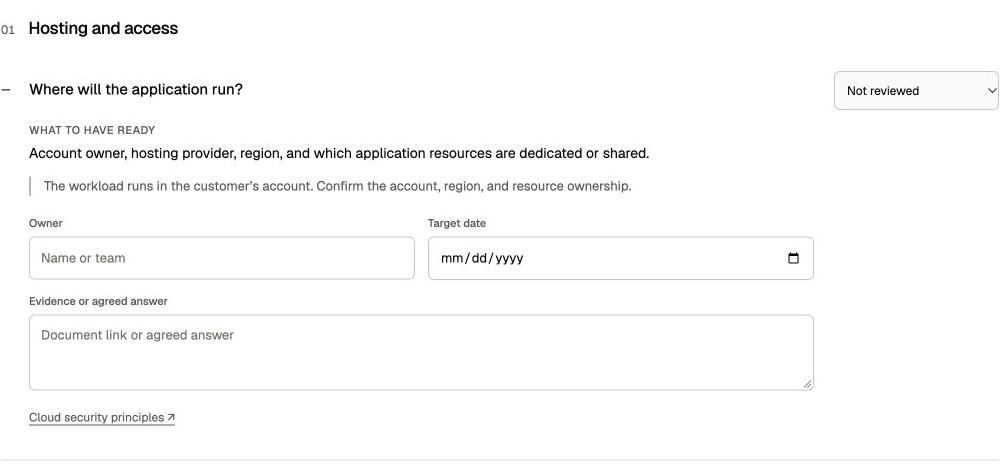
The worksheet keeps each requirement’s owner, target date, and supporting evidence together.
How does Ryvn help with customer-cloud deployments?
Ryvn helps your team deploy software into a customer’s cloud and operate it from a central dashboard. It works with the deployment tools you already use, including container images, Terraform, Helm, and Kubernetes, so you build on the setup you already maintain.
Inside each customer environment, a program called the Ryvn agent checks in with Ryvn’s central service over an outbound HTTPS connection. It picks up deployment tasks, applies them with the permissions the buyer grants it, and records each action in an audit trail. Your team ships changes without opening an inbound connection into the buyer’s network.
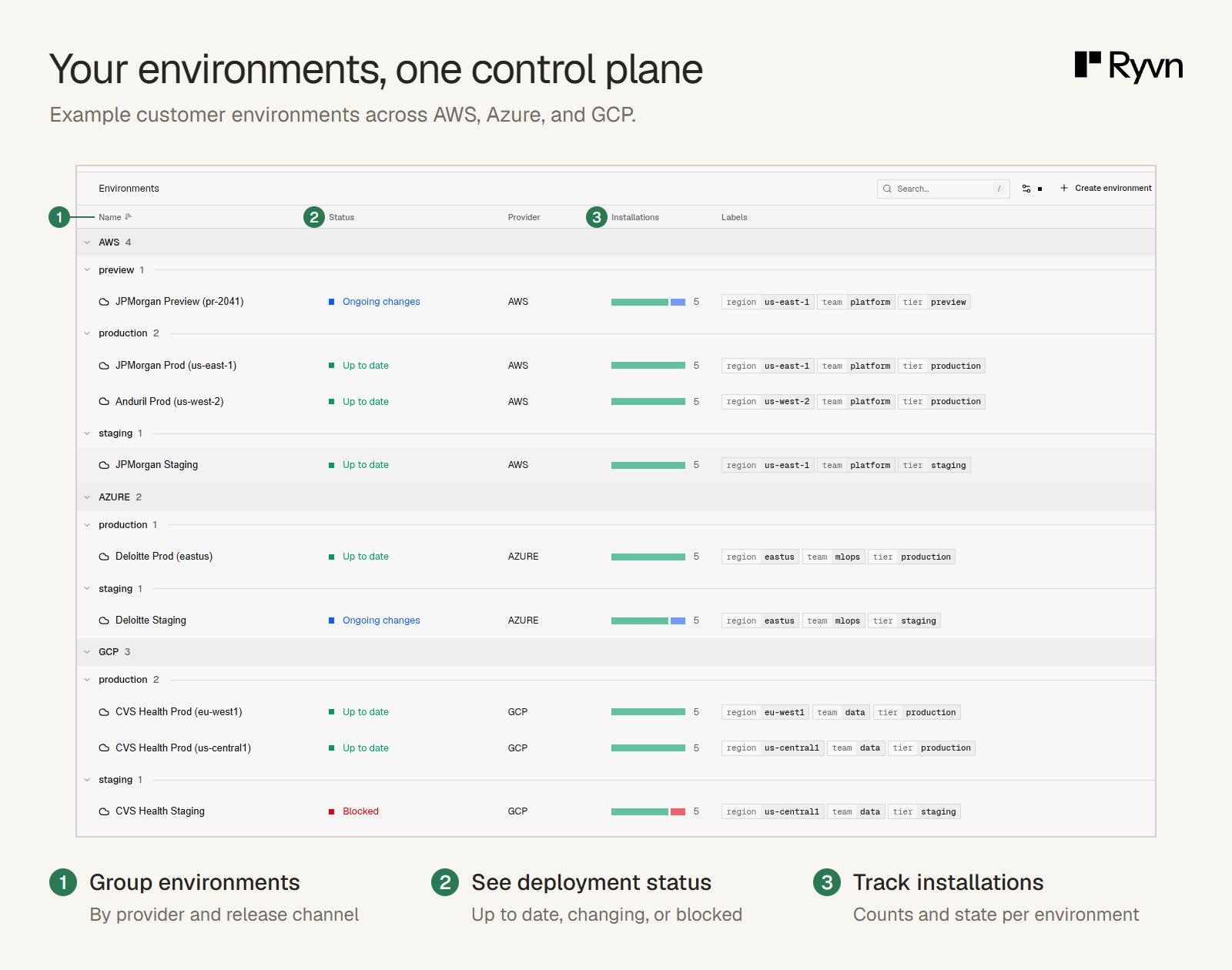
Releases go out in stages across environments, with health checks, rollback, and a deployment history for each customer installation. That matters once several buyers run your software in their own accounts and each release has to reach all of them.
Your team can view deployment status and application logs across customer installations in one dashboard. By default, those logs are stored in Ryvn’s systems for seven days.
For buyers that need strict isolation, logs can stay in the customer’s environment and be transferred for a chosen time window during an incident, or be stored in your own infrastructure.

Ryvn’s task view shows a deployment error summary alongside the logs.
For installations that need change approval, Ryvn can generate a preview and wait for an authorized reviewer before applying an update. The preview shows the full Terraform plan or a diff of the Kubernetes manifests, and the audit trail records the approval.
If a deal depends on deploying into the buyer’s cloud, talk to us about your setup and the customer’s requirements.
Frequently asked questions
Is customer-cloud deployment the same as on-premises?
Customer-cloud deployment runs in the buyer’s own account with a provider such as AWS. On-premises software runs in the buyer’s data center, and an air-gapped install runs on a network with no internet connection. Either the vendor or the buyer can operate any of them, and Self-Hosted vs BYOC compares the two operating models.
Can the same application support hosted SaaS and customer-cloud deployments?
Yes, once nothing in the application assumes it runs in your account. Common blockers are:
- Endpoints for managed services in your cloud written into the code.
- Tenant logic that assumes a shared database.
- License or feature checks that call your servers.
- Telemetry sent to your systems by default.
Once those are configured, the same release can run in both places.
Who pays the infrastructure costs for customer-cloud deployment?
Typically, the customer pays its cloud provider, with software and vendor support charged separately. The infrastructure bill depends on resource usage and the customer’s pricing agreement with its cloud provider.
Do you need SOC 2 before an enterprise deal?
Not always. With BYOC, an enterprise buyer may not require your company to have a SOC 2 report, particularly when its data stays in its own cloud account and your team has limited access. Confirm the requirement with the buyer’s security team: its policies and your operational responsibilities determine what evidence it needs.
How long does an enterprise deployment take?
It depends as much on the buyer’s approvals as on your engineering work. Account setup, access sign-off, and security review on the buyer’s side can take longer than the installation itself. Agreeing early on access and the evidence the buyer needs is the part of the timeline you control.